



Three months ago, we were just asking ChatGPT basic questions. Today we have AI agents running our SEO pipeline, optimizing our Google Ads account daily, building case studies from scratch, and managing most of our marketing operations. Here’s exactly how we did it, and how you can too.
We recently hosted an AI in marketing webinar where we walked through the five marketing workflows we’ve automated with AI agents. We wanted to go beyond theory and actually show our real setups, real prompts, and real results. This post is the complete breakdown of everything we shared.
A quick note about us: Mada used to be a software developer, stopped coding for many years, and co-founded Branch (which grew to $100M+ revenue) where she led marketing. Dan has spent his career in demand gen and marketing operations at companies like Outreach, MuleSoft, and Branch. We started Upside to solve problems we both lived with for years: not understanding what’s actually working in marketing.
The GTM AI Adoption Ladder
As we’ve been talking to customers and other marketers, we’ve noticed a clear pattern in how people adopt AI for go-to-market work. We built what we call the GTM AI Adoption Ladder, inspired by something Gary Tan created for engineers, but tailored for GTM teams.
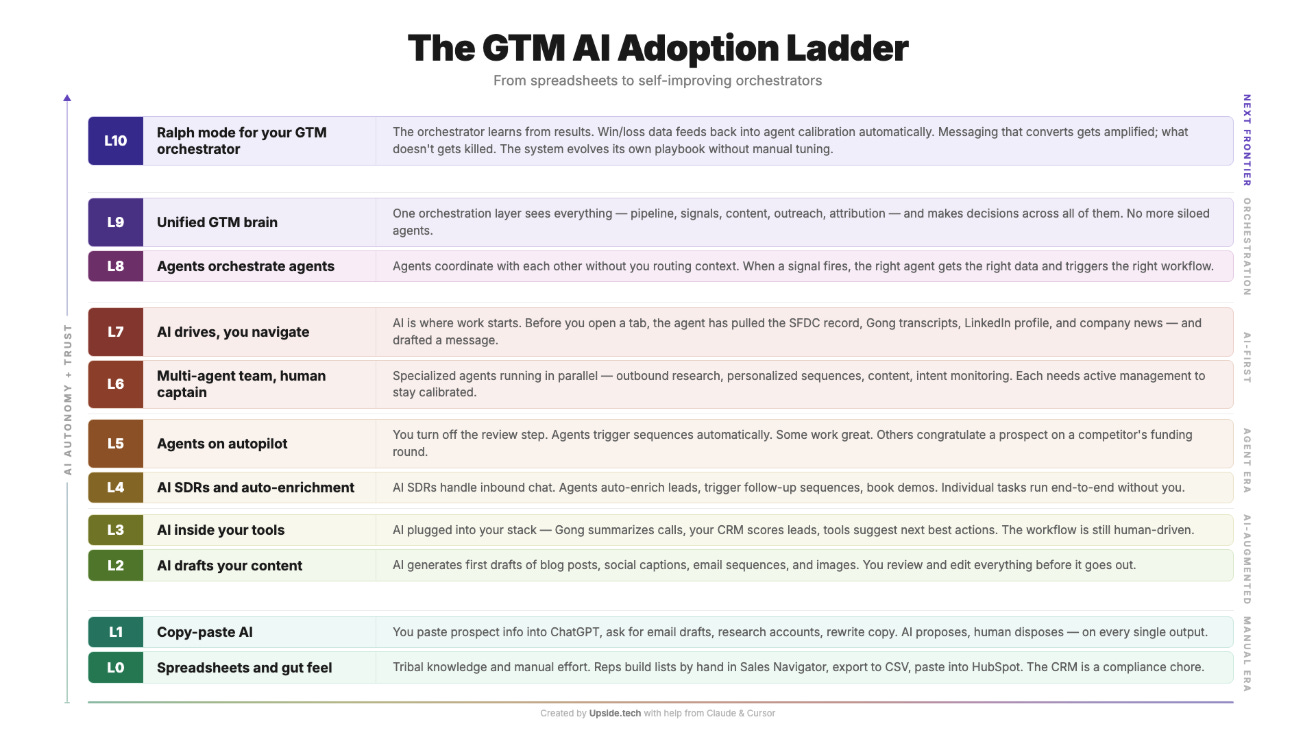
People start at the bottom, just copying and pasting stuff into ChatGPT. Then they move to having AI draft content. Then AI gets plugged into your tools. Then AI starts handling lead enrichment. Then agents start running on autopilot. And at the very top? The orchestrator learns from its own results and evolves without you having to tune it manually.
Three months ago, Mada was probably at Level 1 or 2. Even in just three months, she’s now closer to Level 8 or 9. Dan has built one workflow (the ad optimization agent, which we’ll cover) that we think actually qualifies as Level 10. The pace of improvement here is wild.
Our Favorite Orchestrator AI Tools for Marketing
Everyone has their own setup, and people talk a lot about Claude. But we actually use three main tools, each for different things.
Claude
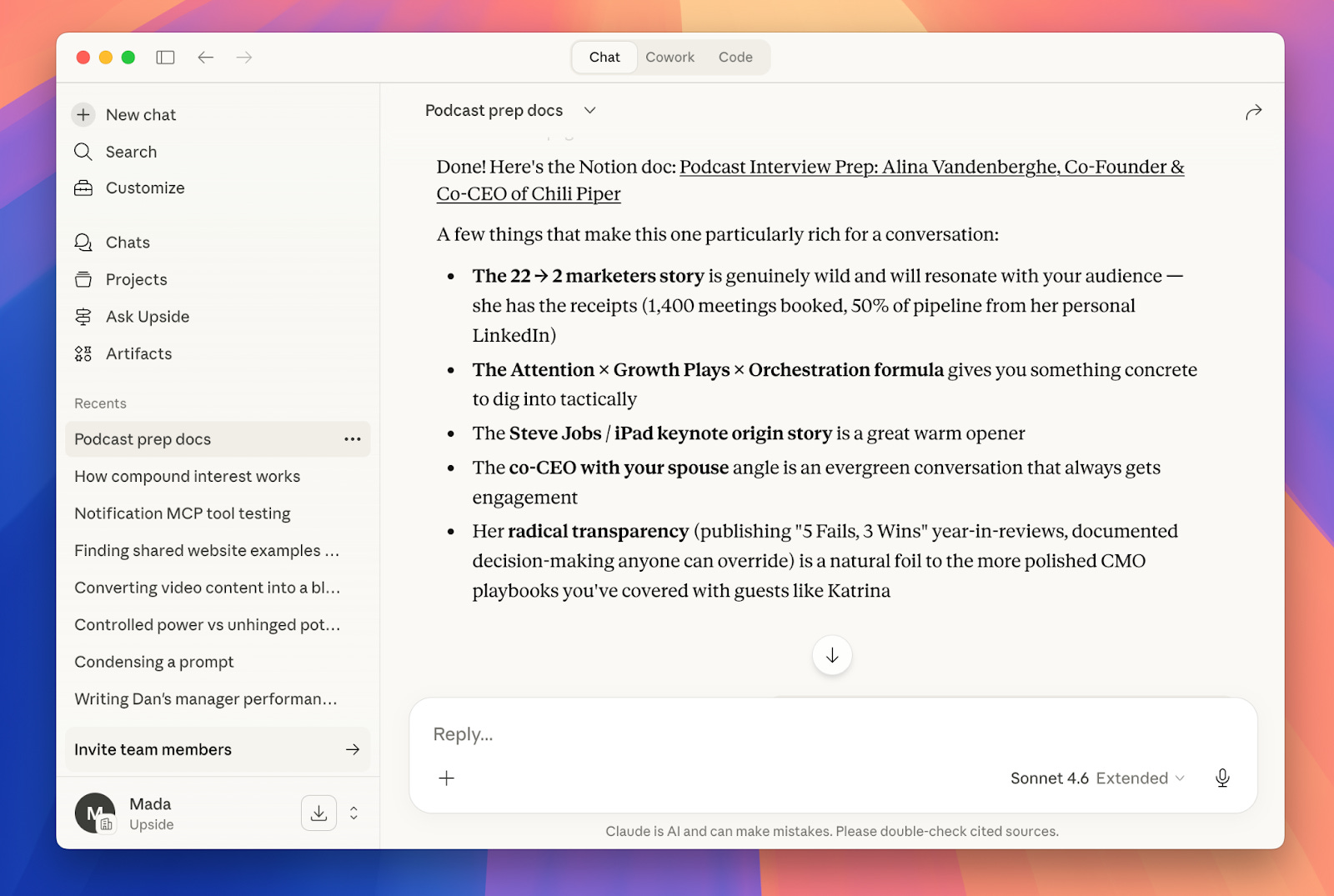
This is the one everyone knows. Dan and we both use it, but it’s not actually our primary tool. It’s best for research, writing, and analysis. Mada was prepping for a podcast interview recently and asked Claude to research the guest and generate questions. It did such a good job finding all the background and context that would have taken an hour to do manually. She only had to add a few questions on top.
Craft Agents
This is Dan’s favorite tool. Craft is similar to Claude in some ways, but it has built its own connectors to services like Substack, Google Sheets, and more. For example, Mada built an entire article in Craft and it published directly to Substack, which was really smooth. The big difference is that Craft lets you build automations, schedule recurring tasks, and connect to pretty much anything.
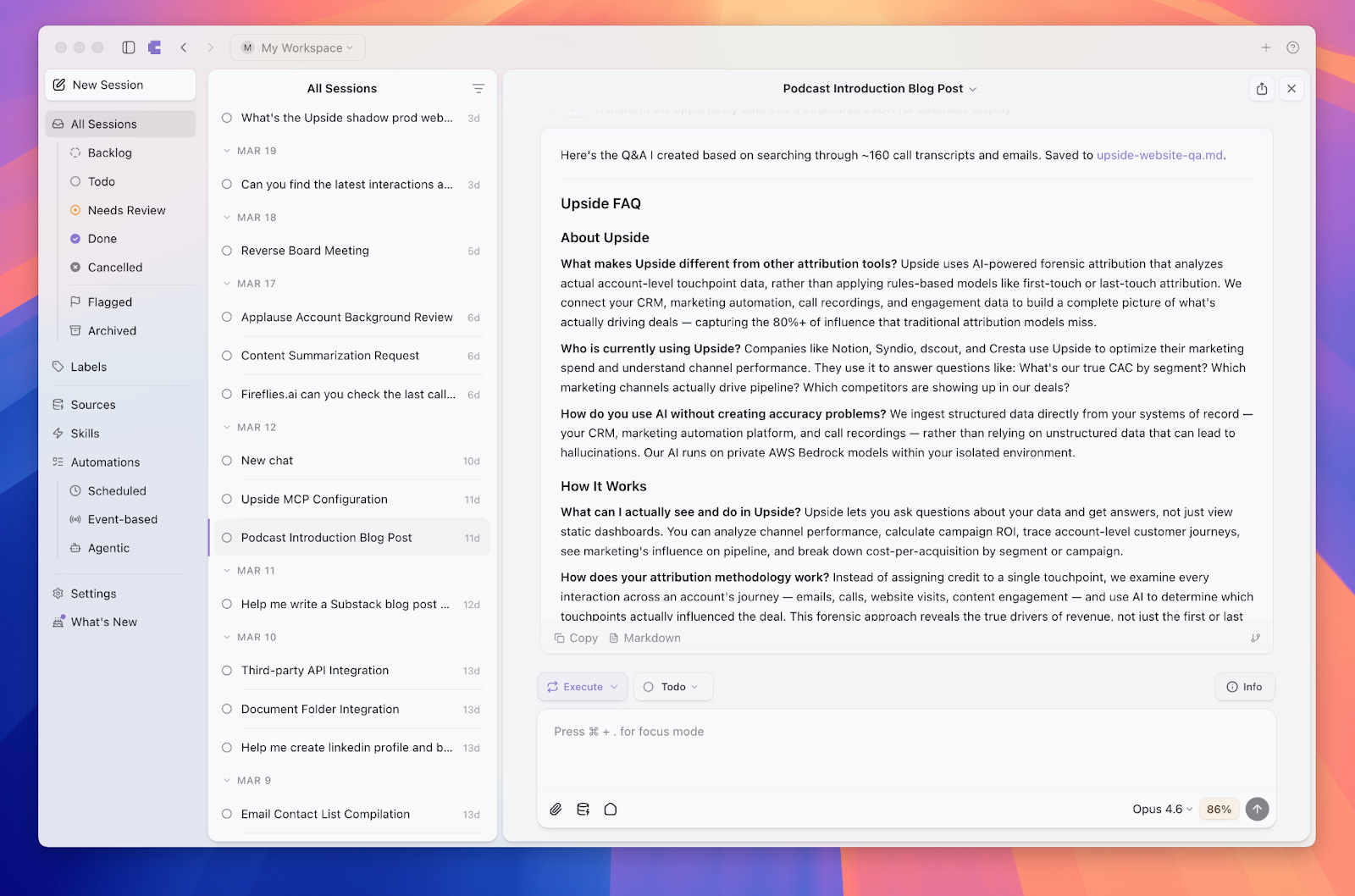
One thing to keep in mind: Craft is great for builders and people you trust to know how to use data. It’s harder to control what people connect to across a whole organization. Claude, on the other hand, has really good security controls, which makes it better for large teams.
Cursor
Yes, Cursor is technically a developer tool. Mada has never written a line of code in it. But she finds it really powerful for building reports, HTML files, dashboards, and interactive apps. Even though it doesn’t build its own connectors the way Craft does, it’s more flexible in letting you add your own connectors. The harness of Cursor just feels more powerful than using Claude directly for building things.
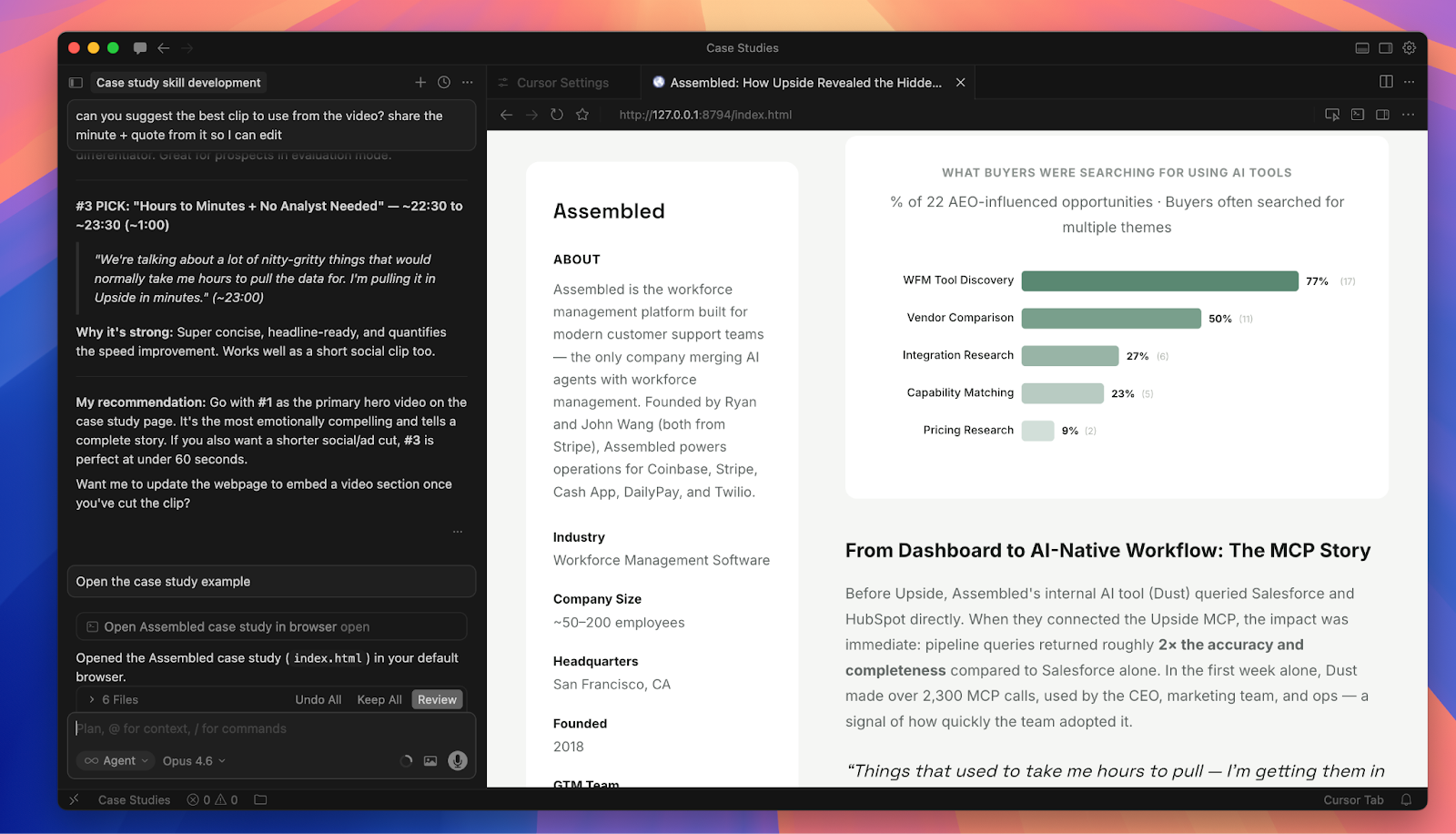
Pro tip that made a huge difference for us: Make sure you’re using the latest model. When Mada started with Cursor, her results weren’t great, and her team pointed out she wasn’t using Opus 4.6. The model you pick is probably the single most important factor in the quality of work you’ll get. We’ve found that Opus is dramatically better than Sonnet and Haiku for these kinds of tasks. Hallucinations are rare these days if you’re on the right model.
What is an MCP (and Why Marketers Should Care)
A lot of our workflows use MCPs, so let’s quickly explain what they are. MCP stands for Model Context Protocol. It’s basically a wrapper around an existing API that is custom designed for an AI agent to use.
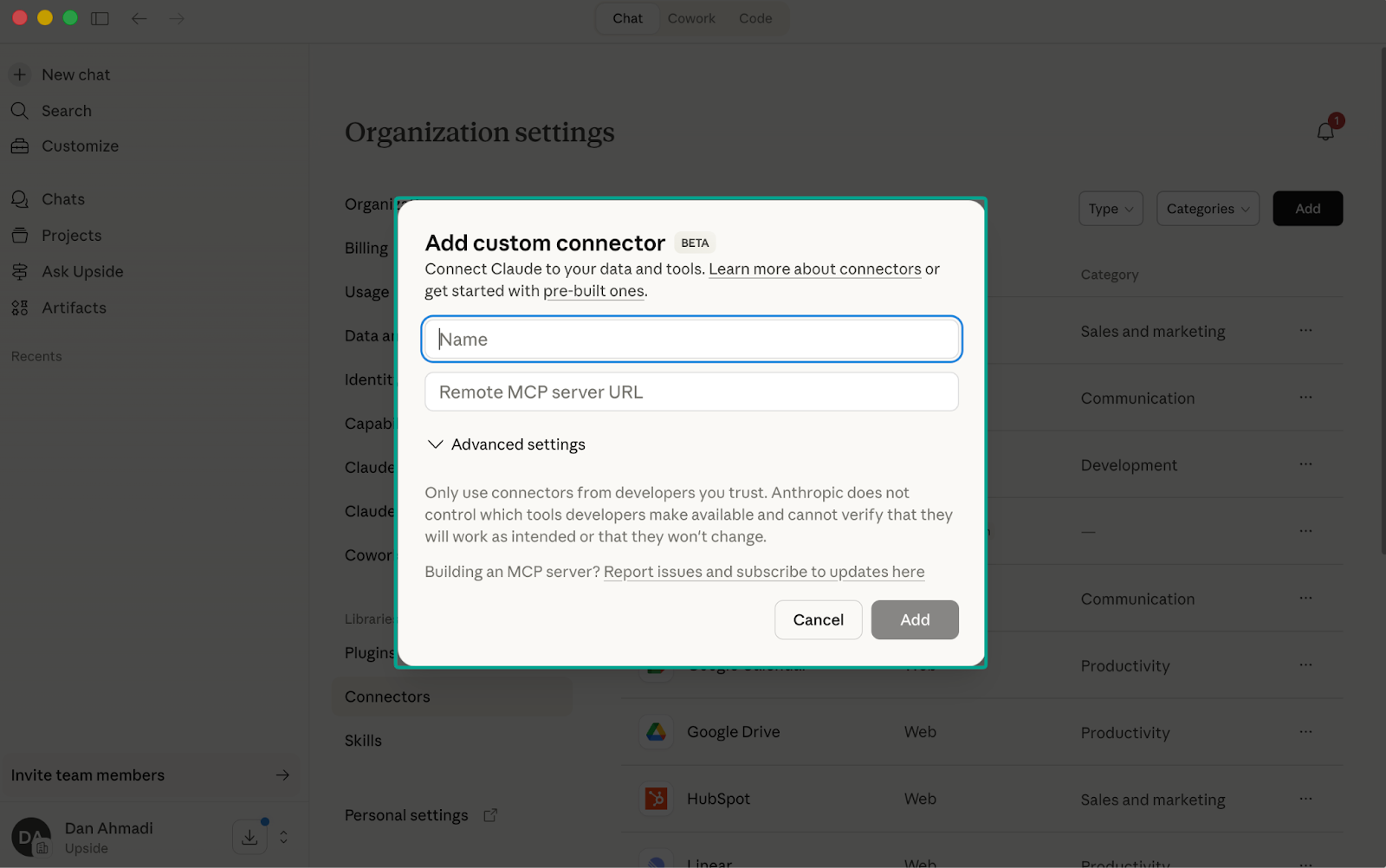
If you’ve worked with APIs before, you know they’re built for developers. There’s documentation you have to read, authentication to figure out, query formats to learn. With an MCP, you just give the AI agent a URL, and it configures itself. It figures out how to use the tools, what the best practices are, and basically trains itself.
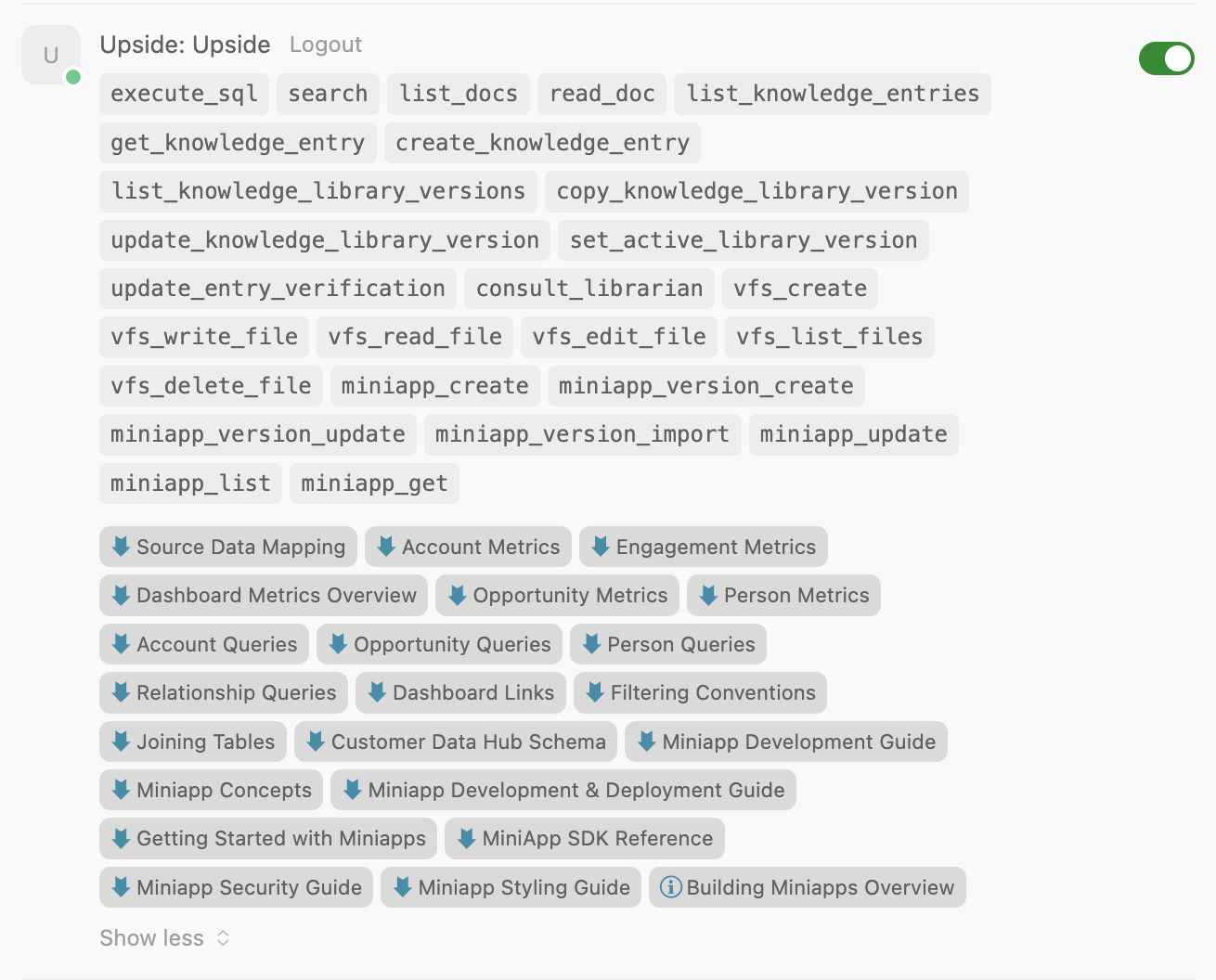
The Upside MCP, for example, includes things like what analytical mini-apps should look like, what the styling guide is, how to query customer data. When you connect it to Claude or Craft, the agent just knows how to use all of that immediately.
Skills: Turning Prompts into Reusable Instructions
The other concept that powers everything we do is “skills.” Skills are basically the ability to turn prompts into reusable instructions. They sound complicated but they’re actually simple to create. You can ask Claude or Craft or Cursor to help you create a skill.
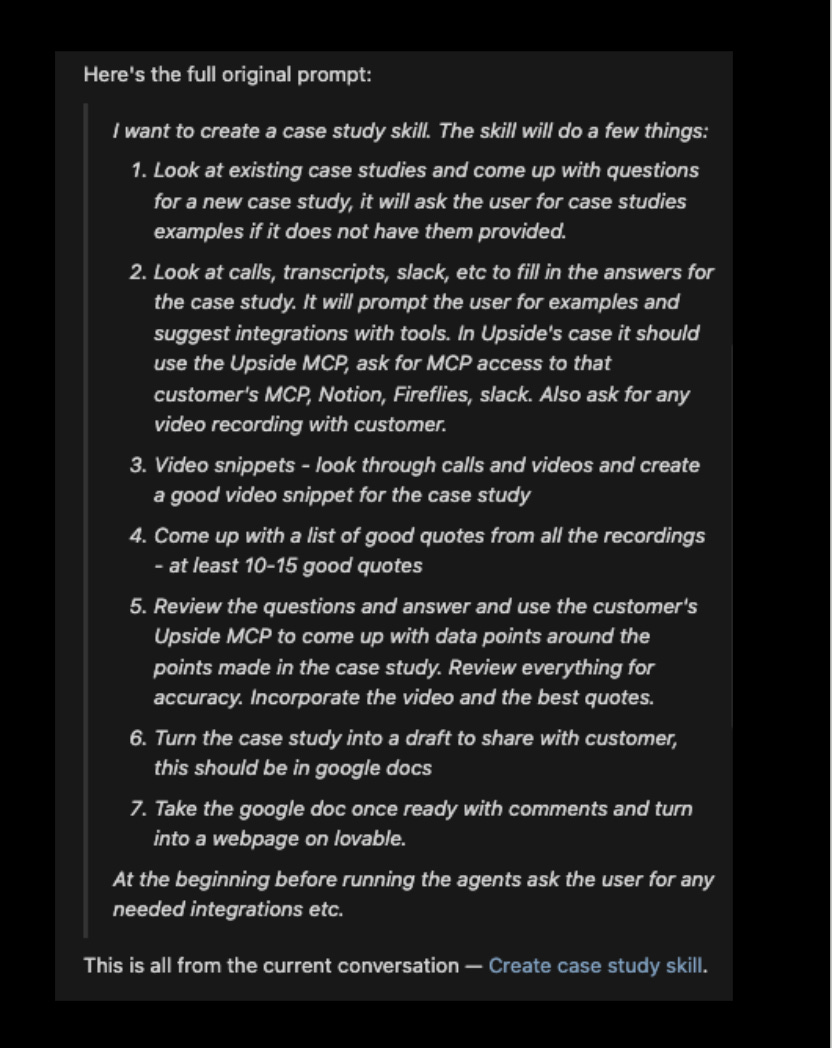
Under the hood, a skill is just a markdown file that gives the AI agent structured instructions. AI agents are better at reading this format than plain text. But here’s the thing: you don’t need to write this file yourself. You go through a session, do the work, and then at the end say “Hey, make a skill based on everything we just did.” It creates the skill file, and next time you can just reference it.
In Craft, you can even set up recurrence. For example: “Turn what we just did into a skill and run it three times a day at these times.” One important caveat though: in Craft, your computer needs to be on for scheduled skills to run. Cursor has something called background agents that don’t require your computer to be on, but we haven’t tried those for marketing workflows yet.
Workflow 1: Building a Case Study (Fully Automated)
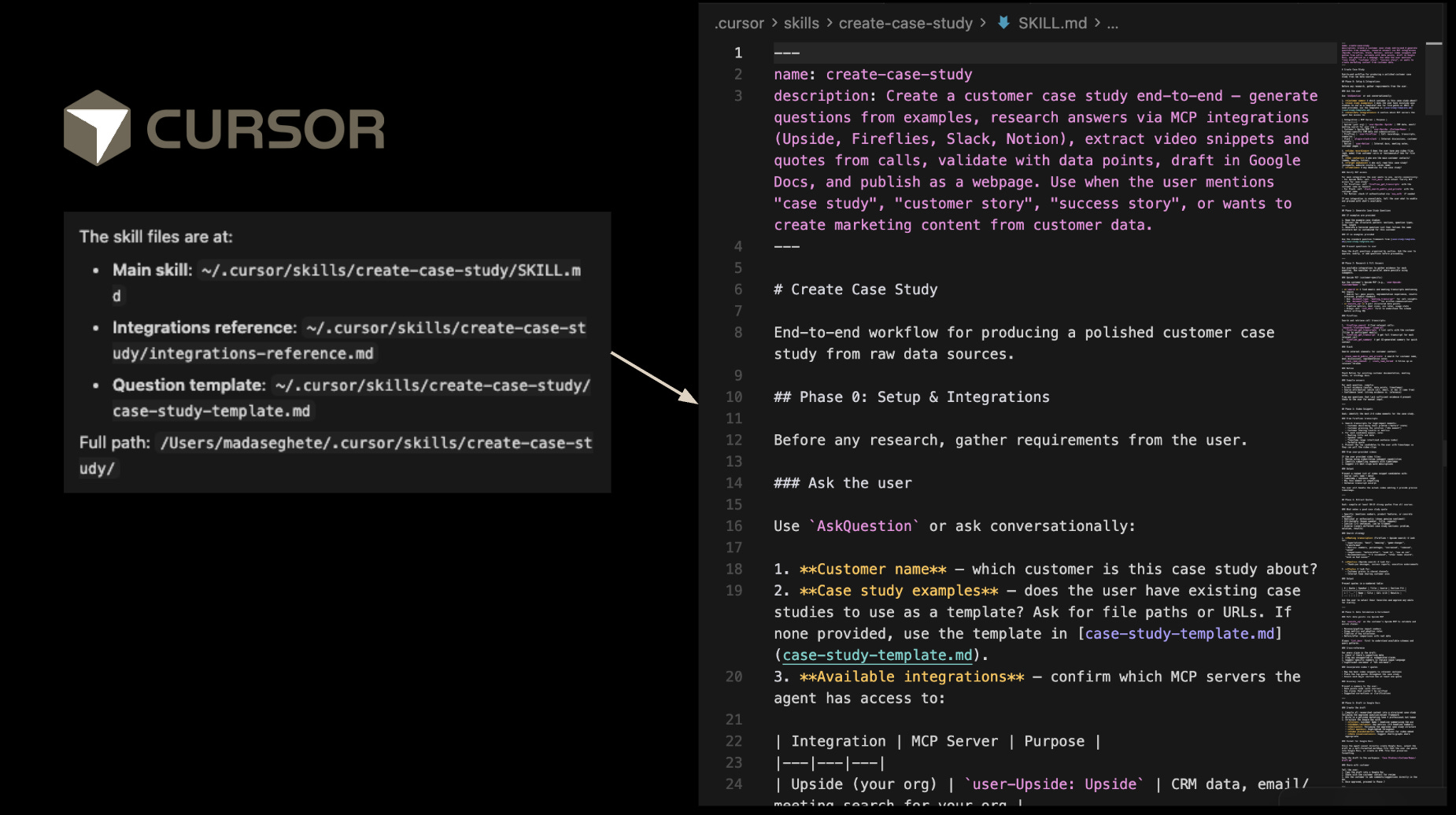
This was Mada’s first skill, and it’s the one she’s most proud of. Building case studies used to involve a ton of manual work: researching the customer, coming up with interview questions, conducting the interview, pulling metrics, writing the narrative, formatting everything.
The first few case studies on our website were built with AI help, but in a very manual way. Ask the MCP for questions, interview the person, feed the recording back in, try to turn it into HTML. Way too many steps. So Mada set out to automate the entire pipeline into a single skill.
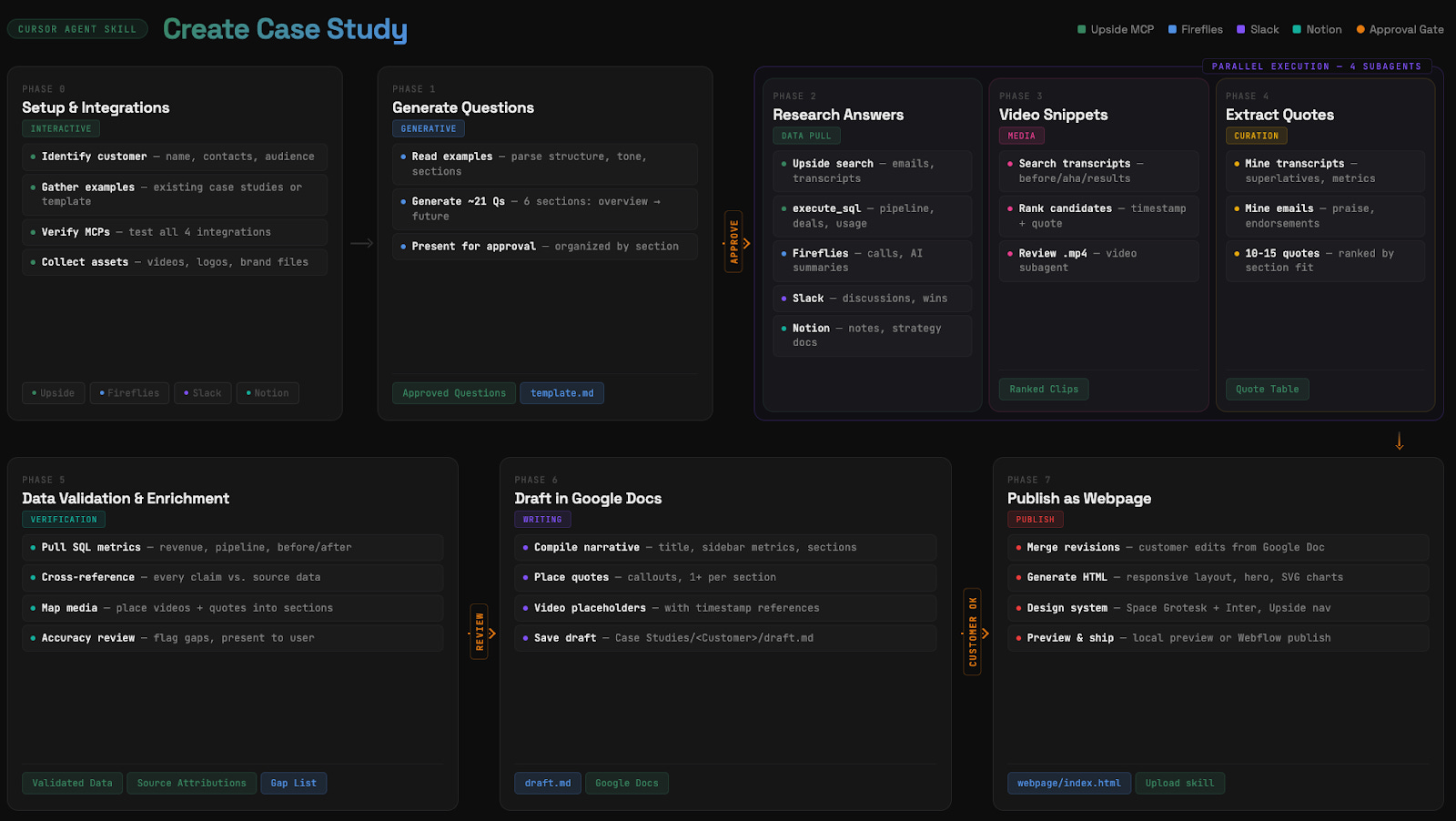
Here’s how the skill works:
Phase 0: Setup and Integrations. You give it the customer name and point it at example case studies. It then connects to the Upside MCP (which has all our Salesforce, HubSpot data, and external call recordings), Fireflies (for deeper internal calls), Slack, and Notion.
Phase 1: Generate Questions. It looks at past case study examples, parses the structure and tone, and generates about 21 questions organized by section. It presents these for approval before moving on.
Phase 2: Research Answers. After the interview is recorded and transcribed (the recording ends up in our MCP automatically), the agent researches answers using the Upside MCP. It runs SQL queries against pipeline data, searches call transcripts, checks Slack discussions, and pulls from Notion docs.
Phase 3 and 4: Video Snippets and Quotes. It searches transcripts for compelling moments, ranks them, and extracts quotes. For our Assembled case study, it even found the exact video timestamp to clip.
Phase 5: Data Validation. This is important. It pulls actual SQL metrics (revenue, pipeline, before/after numbers), cross-references every claim against source data, and flags any gaps. When it gave us metrics, we asked it “how did you calculate this?” and it gave us citations and methodology for each number.
Phase 6: Draft in Google Docs. It creates a draft and shares it. Instead of editing the draft directly, Mada left comments in Google Docs. The agent then took all the comments (and later the customer’s comments) and revised accordingly.
Phase 7: Publish as Webpage. It generates the HTML, applies our design system, and either pushes to Webflow via MCP or outputs an HTML file that we dropped into Lovable.
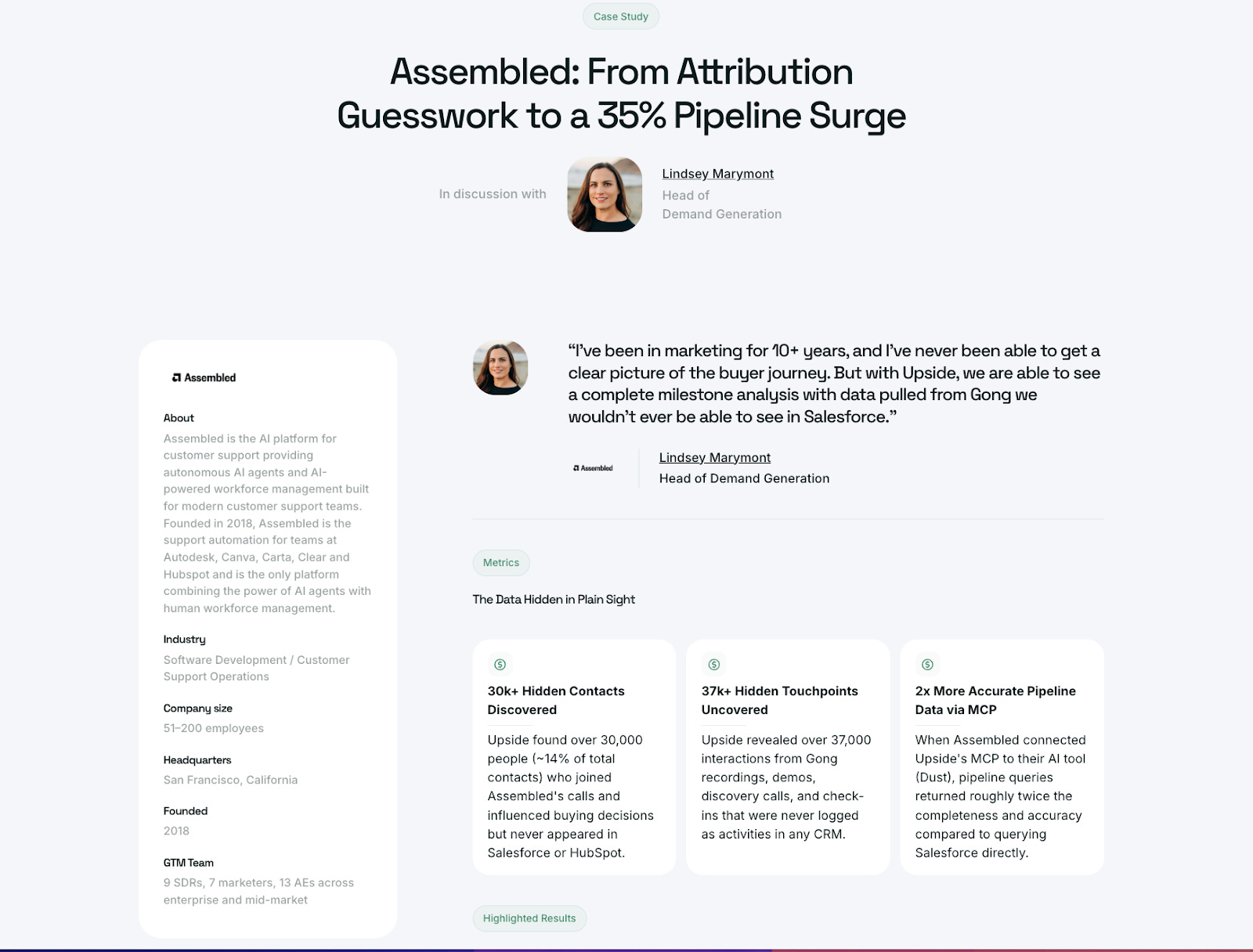
The data points in the case study (30k+ hidden contacts discovered, 37k+ hidden touchpoints uncovered, 2x more accurate pipeline data) were all found by the agent using the Upside MCP. Mada didn’t have to go calculate any of those herself. The agent actually gave her six data points and she just picked the best ones.
One thing we want to emphasize: we still conduct the interview ourselves. We don’t think AI should do that. The interview is about relationship building, and even if it were technically possible to automate, we would not. That human connection matters.
Workflow 2: Content on Steroids
We’ve started a podcast called The Future of Marketing, and Mada wanted to see if she could fully automate turning podcast episodes into Substack posts. She connected Craft to the Google Drive folder where all the podcast recordings and transcripts live, and asked it a question we’d never actually asked our guests directly: “Based on the entire transcript, how would this guest answer the question ‘What is the future of marketing?’”
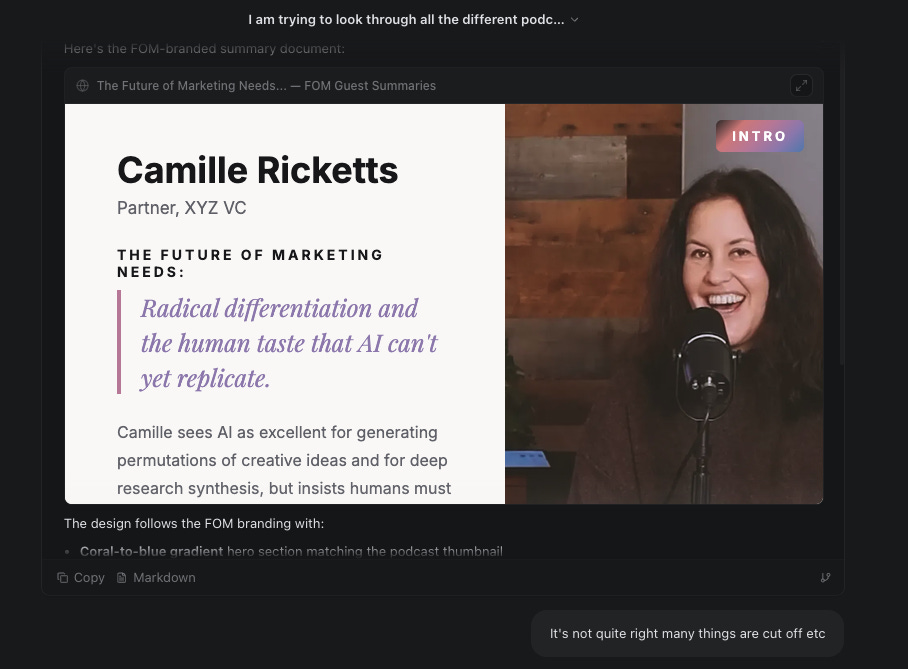
The agent went through each transcript, inferred how the guest would answer, and then created a full blog post. But here’s the really cool part: because we gave it access to the Figma MCP, and our designer had a brand guideline document for the podcast, the agent was able to read those guidelines and create branded images that actually looked professional.
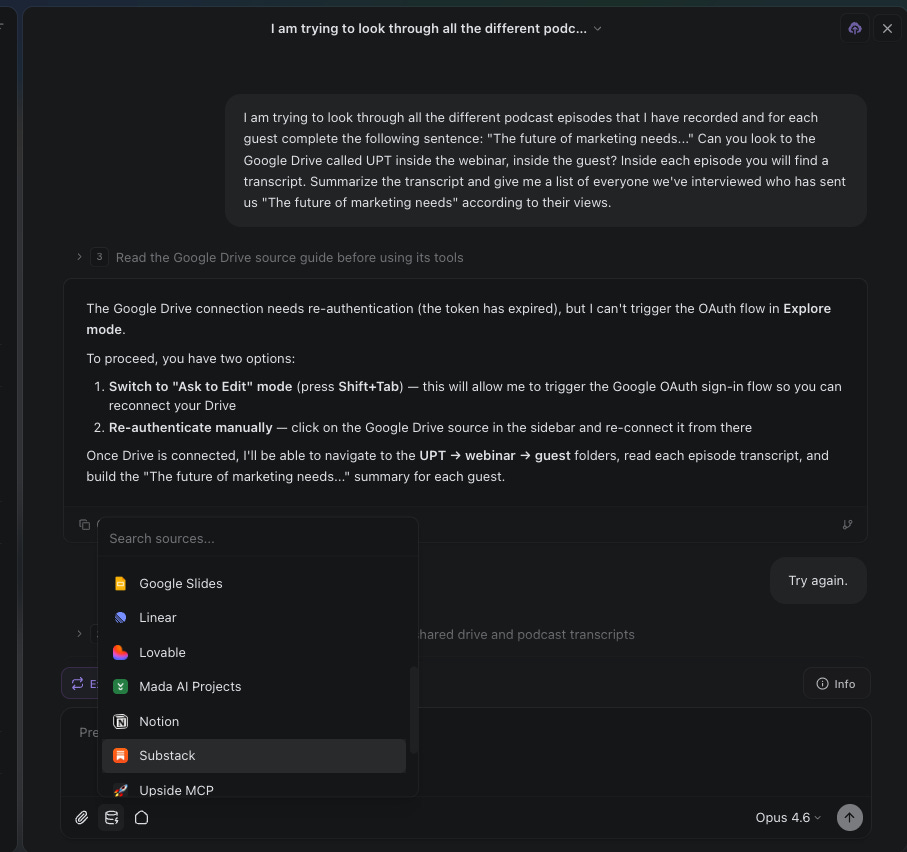
Yes, the content is AI-generated. But it’s based entirely on actual conversations that real people had. The AI is summarizing and synthesizing original content, not making things up. We think that distinction matters a lot.
Workflow 3: GTM Analyst
There are some really powerful things you can do when you give AI agents access to your data. One example: we wanted to figure out the best time to send our outbound emails, based on when those emails actually get responses.
We know there are tools out there that offer this, but we wanted something customized to our specific segments of emails. Dan generated the dashboard you see below with literally one prompt: “Use the MCP, find all the emails we’ve sent, categorize them into ones that had a response, break it down by day of the week and hour of the day.”
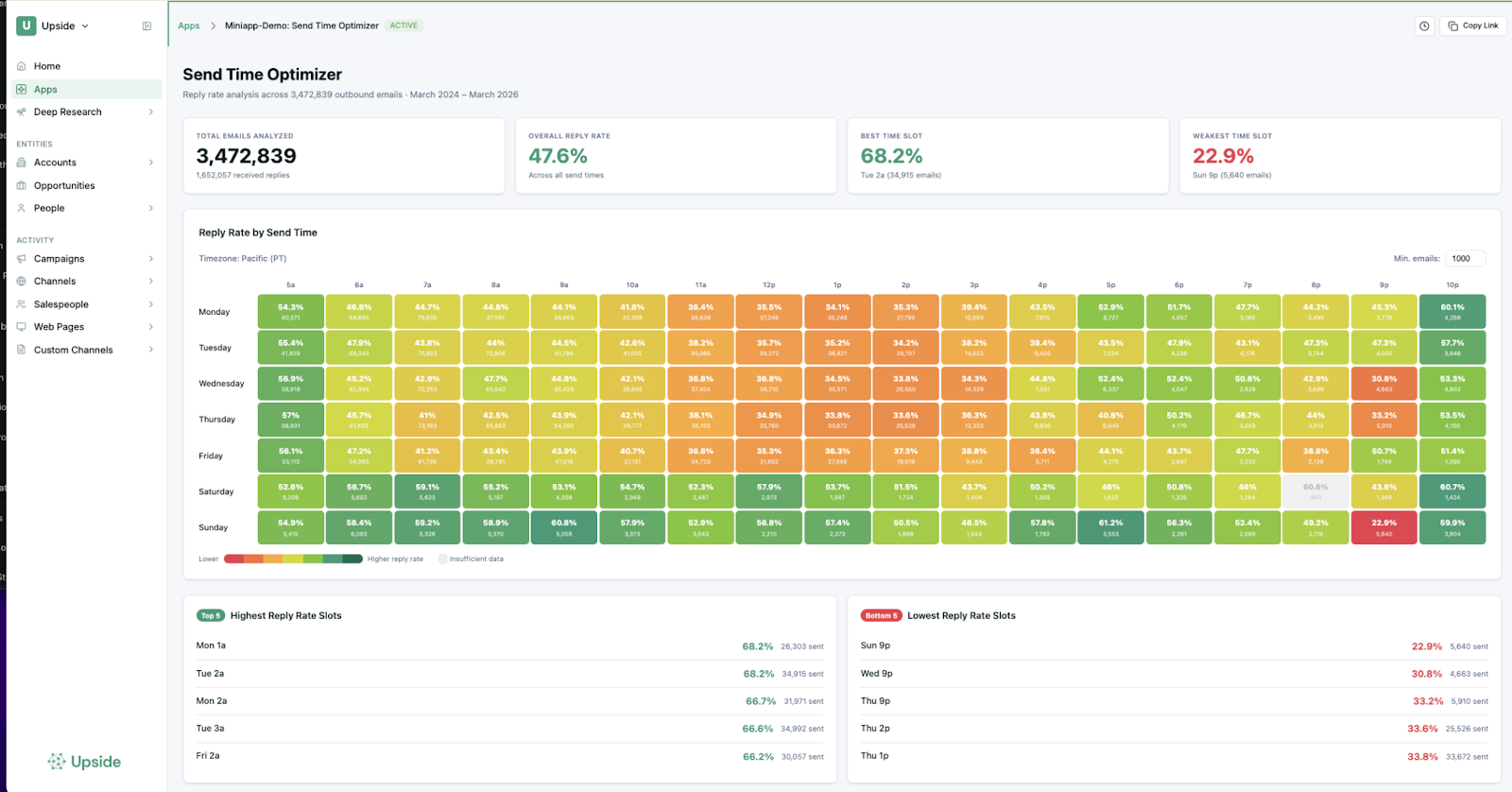
The agent went further than what we asked. It figured out we were probably trying to find optimal send times, so it automatically added tables showing the highest and lowest performing time slots, and it even factored in statistical significance to filter out times where we hadn’t sent enough emails to make a real claim.
Our takeaway from our own data? Send emails early in the morning, before noon. Everything after noon gets progressively worse. Or, interestingly, send on the weekend at night. That seems to work surprisingly well too.
Channel Attribution with AI
We also built something more advanced: a multi-agent attribution system. Seven agents go through a deal and each one argues which touchpoints should get credit. Then a supervisor agent mediates the discussion. “You think this marketing email should get credit. Why?” It reasons through and comes up with a final percentage breakdown.
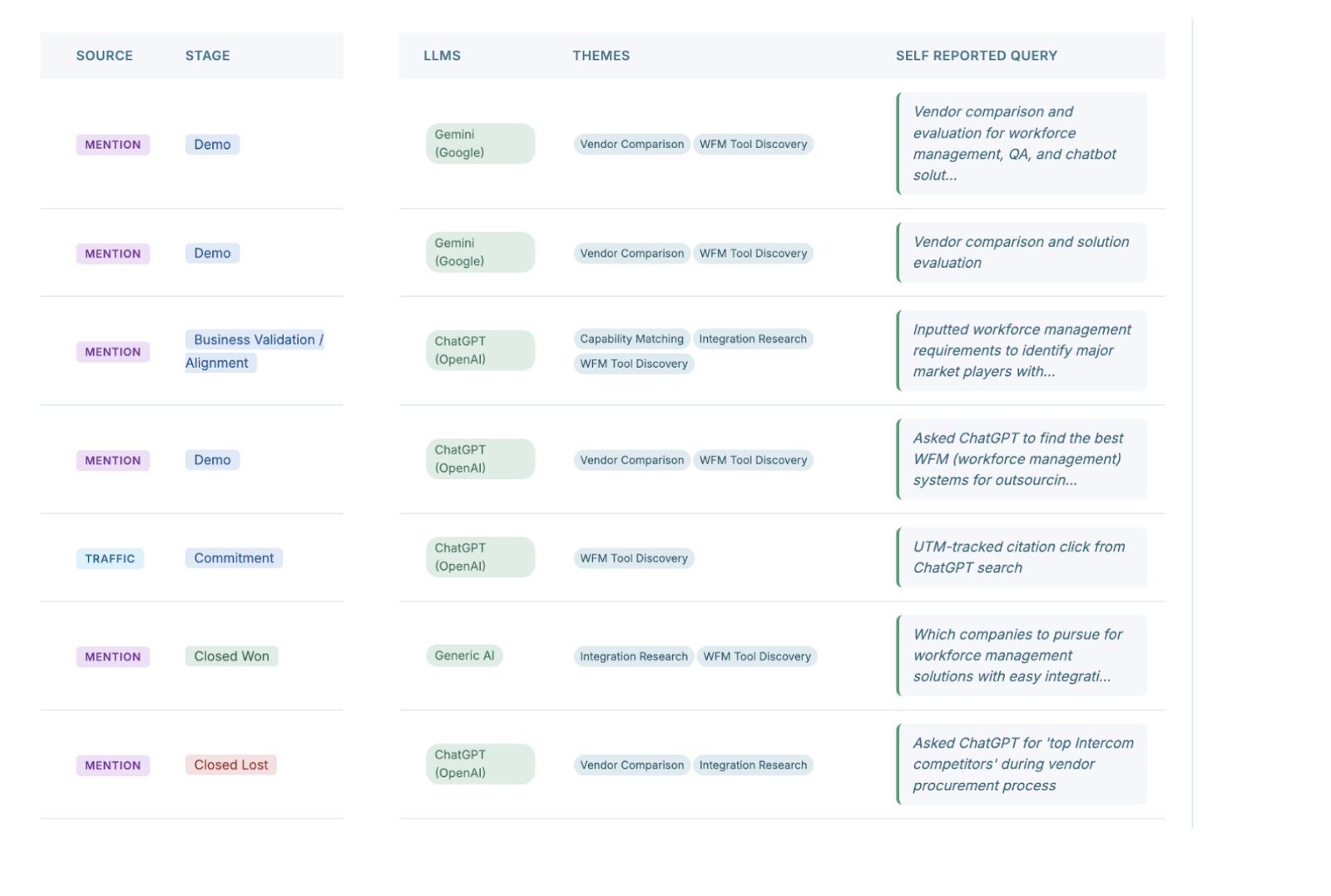
This is a pretty advanced application, and each deal takes about an hour to process. It looks at both explicit touchpoints and inferred influences (things it picks up from call transcripts and emails). Any of our customers could build something similar on top of their own data. (We explored this further in our Revenue Efficiency in the Age of AI panel.)
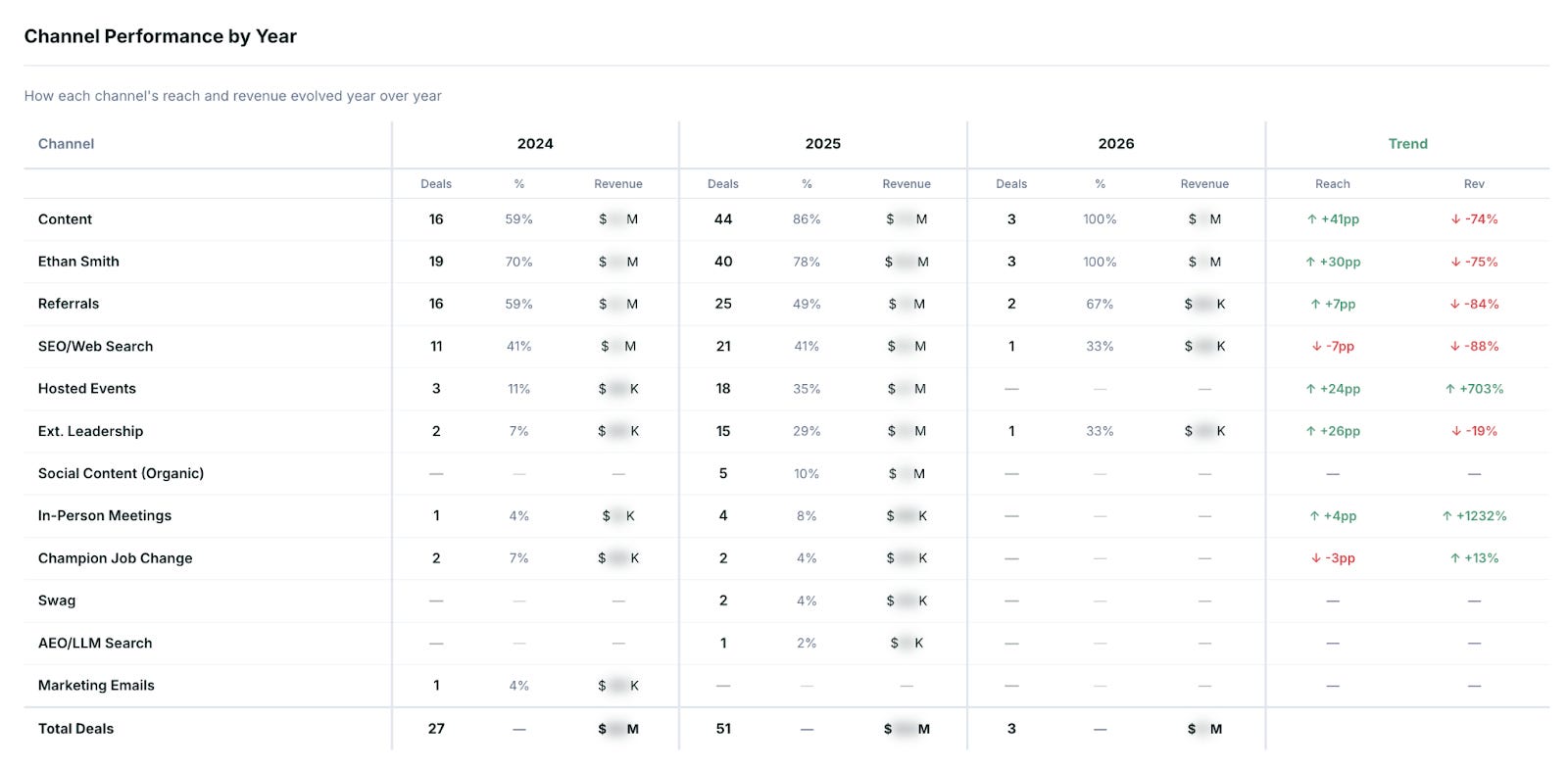
We also helped one of our customers, Ethan, understand what was actually driving his inbound leads. The tool discovered that referrals were huge for his business. And here’s the insight that no dashboard would have surfaced: the people attending his events weren’t directly becoming customers, but they were referring customers. So the ROI of events looked bad on paper, but was actually fantastic when you traced the referral chains.
Workflow 4: SEO Planning and Content Creation
This is Dan’s project, and it’s the most complex orchestration we’ve built. When you think about how SEO actually works, it falls into several buckets: finding keywords, analyzing SERPs, doing research, writing content, polishing it, publishing it, and then monitoring and optimizing over time.
We asked ourselves: how much of this could be done with a series of agents? The answer: almost all of it. But not with one agent. With nine separate agents.
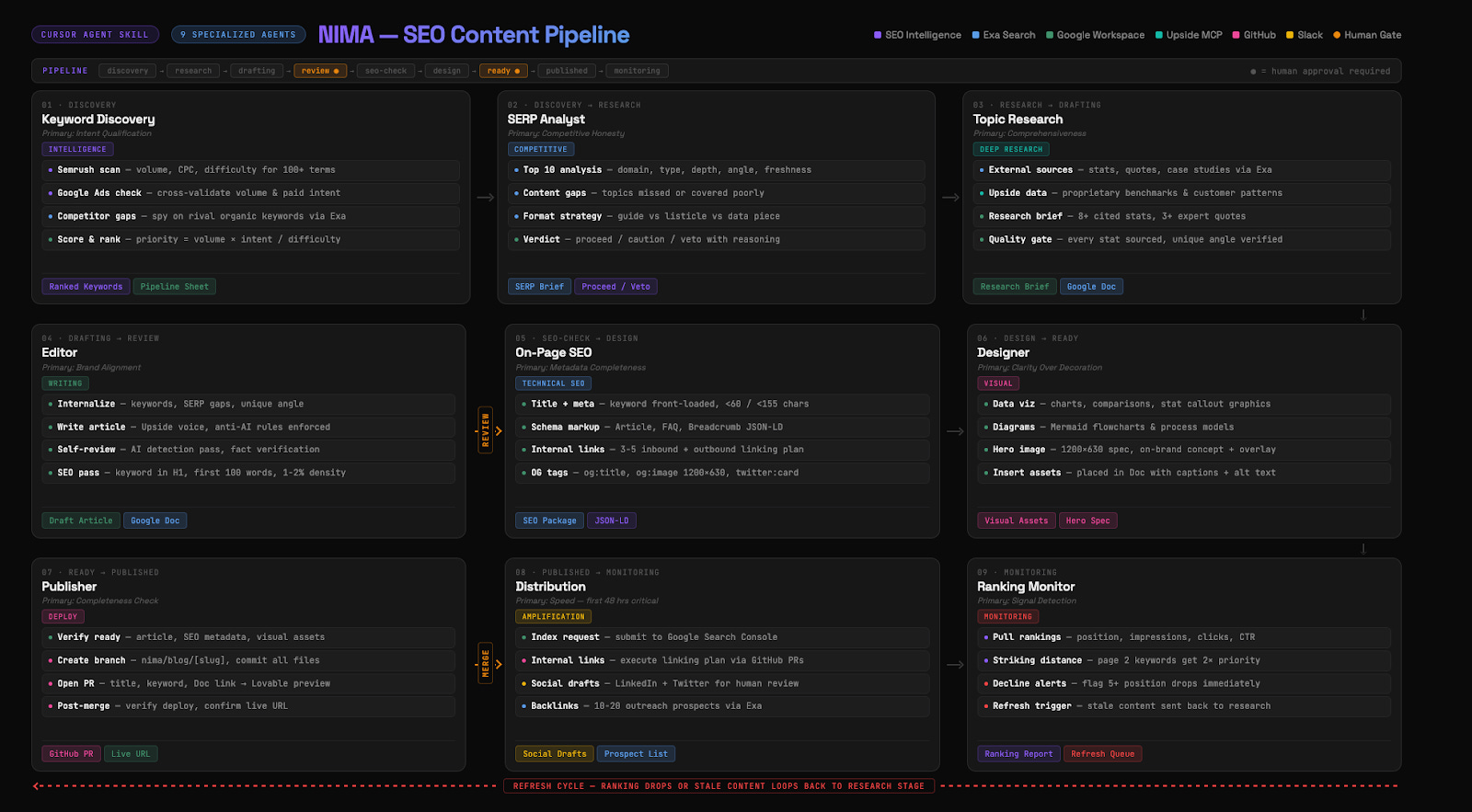
Why nine agents instead of one? Two reasons: context windows and time. If you give one agent this entire job, it will run out of context and start forgetting things. We experienced this firsthand. Mada tried to do a similar analysis with just one agent looking at a hundred deals. After four deals, the agent was doing great. By the end, it had forgotten half the instructions and dropped the quotes it was supposed to include. It also took four hours. We names this NIMA after Nima Asrar Haghighi who taughed Dan everything he knows about SEO.
By breaking the work into specialized agents, each one becomes really, really good at just one thing. They start to emulate what an actual SEO team looks like in practice.
The whole system was created with a single (very long) prompt: “Build an AI-powered SEO content pipeline with nine specialized agents that go from keyword discovery to publication. Each agent has one responsibility. They read from one shared backlog in Google Sheets. When they finish their work, they put the output in a file that the next agent picks up.”
How the Pipeline Flows
The orchestrator (the 10th agent) sits on top and acts like a project manager. It looks at the sheet, figures out what needs to happen next, calls the right sub-agent, reports progress, sends Slack messages, and makes sure the process moves forward. It never writes content itself.
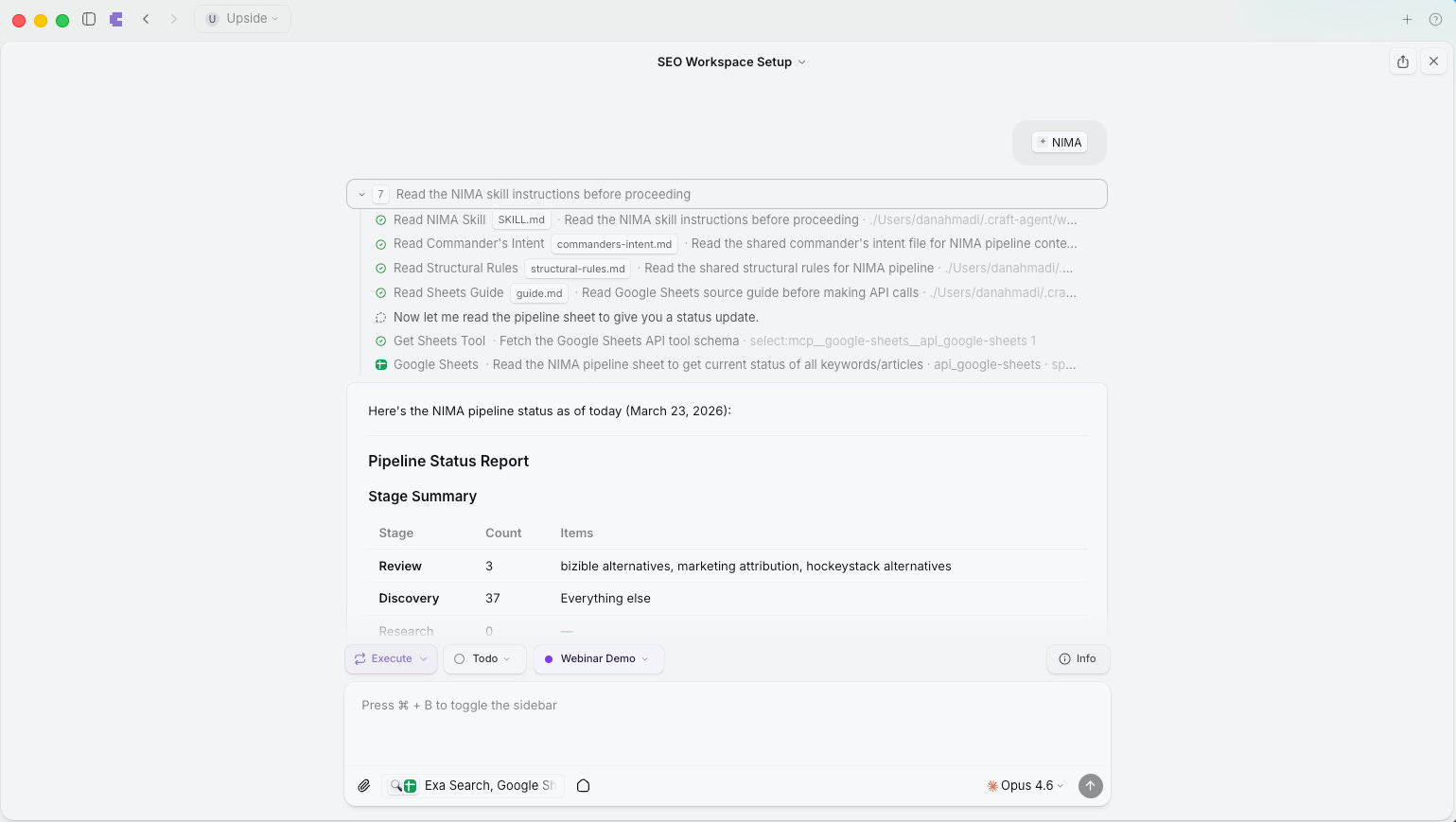
The keyword discovery agent connects to Google AdWords and SEMrush to find high-potential keywords. The SERP analyst evaluates the competition for each keyword and decides whether we can realistically outrank what already exists.
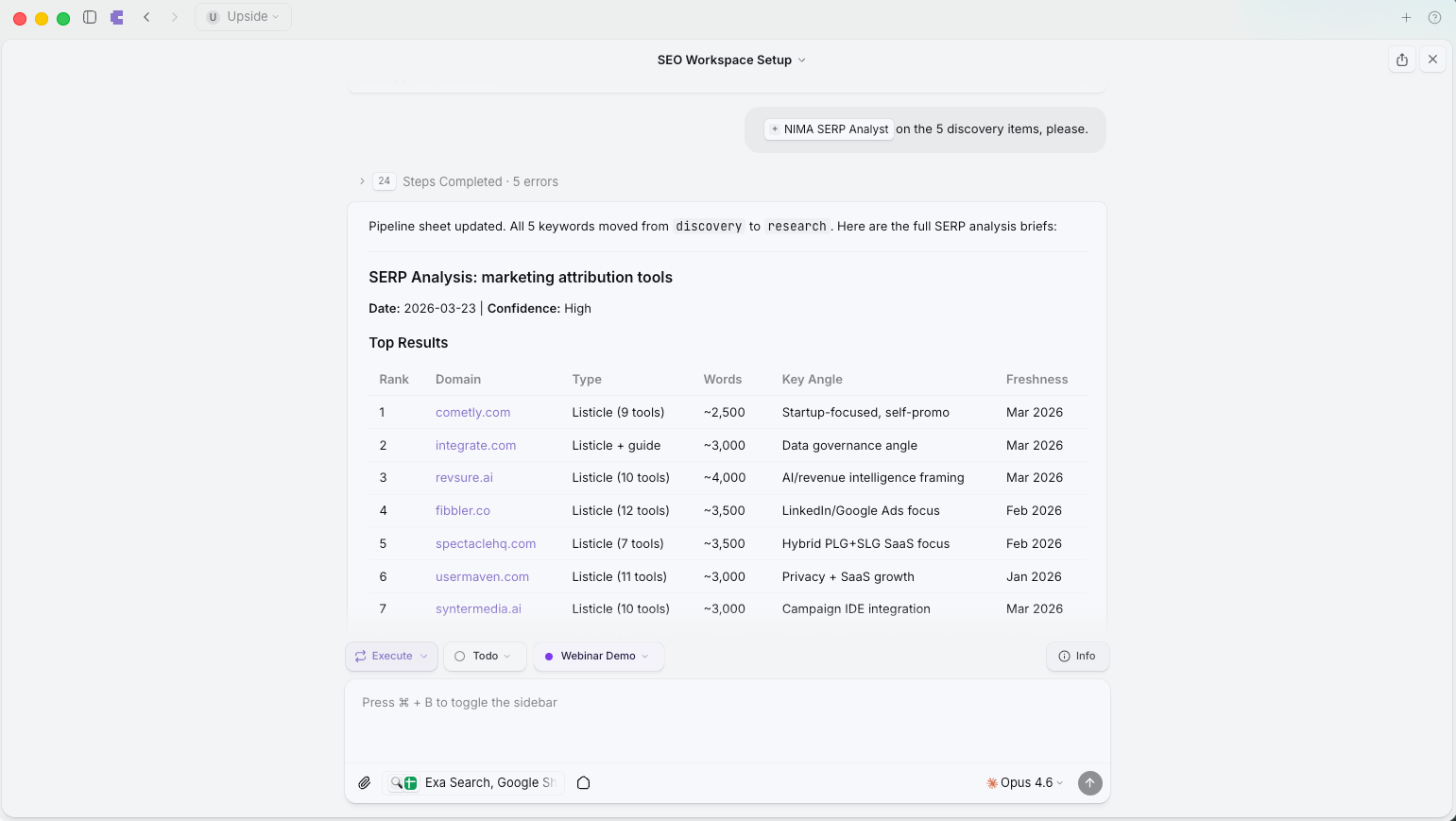
The topic researcher creates a full research brief pulling from external sources (via Exa web search) and internal data (via the Upside MCP, which gives it access to what we’re hearing on customer calls, what language our prospects use, what problems they describe).
The editor agent takes only that research brief (not the internet, just the compiled research) and writes a draft. This is important: by constraining what it can see, the output is much more focused. When done, the article goes into a Google Doc for our human review.
When we leave comments and feedback, the agents incorporate that feedback into their own prompts so they learn over time. The orchestrator can even reject work and send it back for additional editing if it doesn’t meet quality standards.
On avoiding AI-sounding content: We’ve built guidelines into the editor agent to avoid telltale signs of AI-generated writing (m-dashes are banned, for example). The agent is also designed to pull actual quotes from things we’ve said on calls and in emails, so the writing comes out in our own voice. Nothing gets published without human review.
Workflow 5: Ad Campaign Management and Optimization
This is the one Dan is most excited about, and honestly, we think it might be the most impressive. Dan was staring at an empty Google AdWords account and realized: building this out manually (ad groups, ads, keywords, negative keywords, bid management, testing) is a massive amount of work for a whole team. But we have agents now.
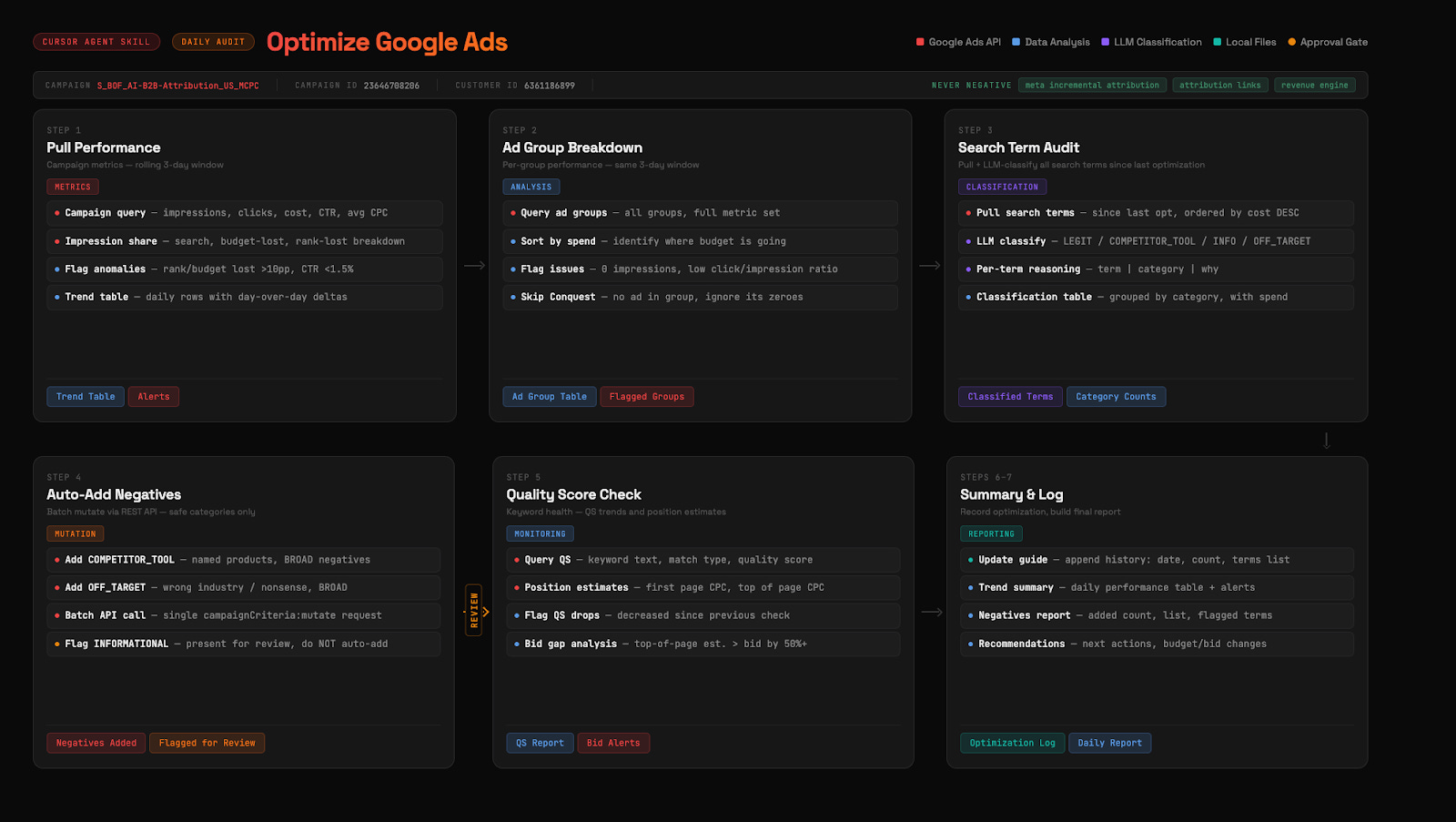
The prompt: “Build an AI-powered Google Ads optimization agent that runs daily. Pull performance metrics since the last run, classify search terms using LLMs and web research, and automatically add negatives for terms that don’t relate to us.”
Here’s how it works in practice. The agent checks what keywords we showed impressions for, then uses the Upside MCP to understand if that keyword is relevant to what we do. It also does a web search to see what comes up for that keyword and assesses whether we should be bidding on it. Irrelevant terms get added as negatives automatically. Terms it’s unsure about get sent to Dan for his opinion. And when Dan provides that feedback, the agent remembers it going forward.
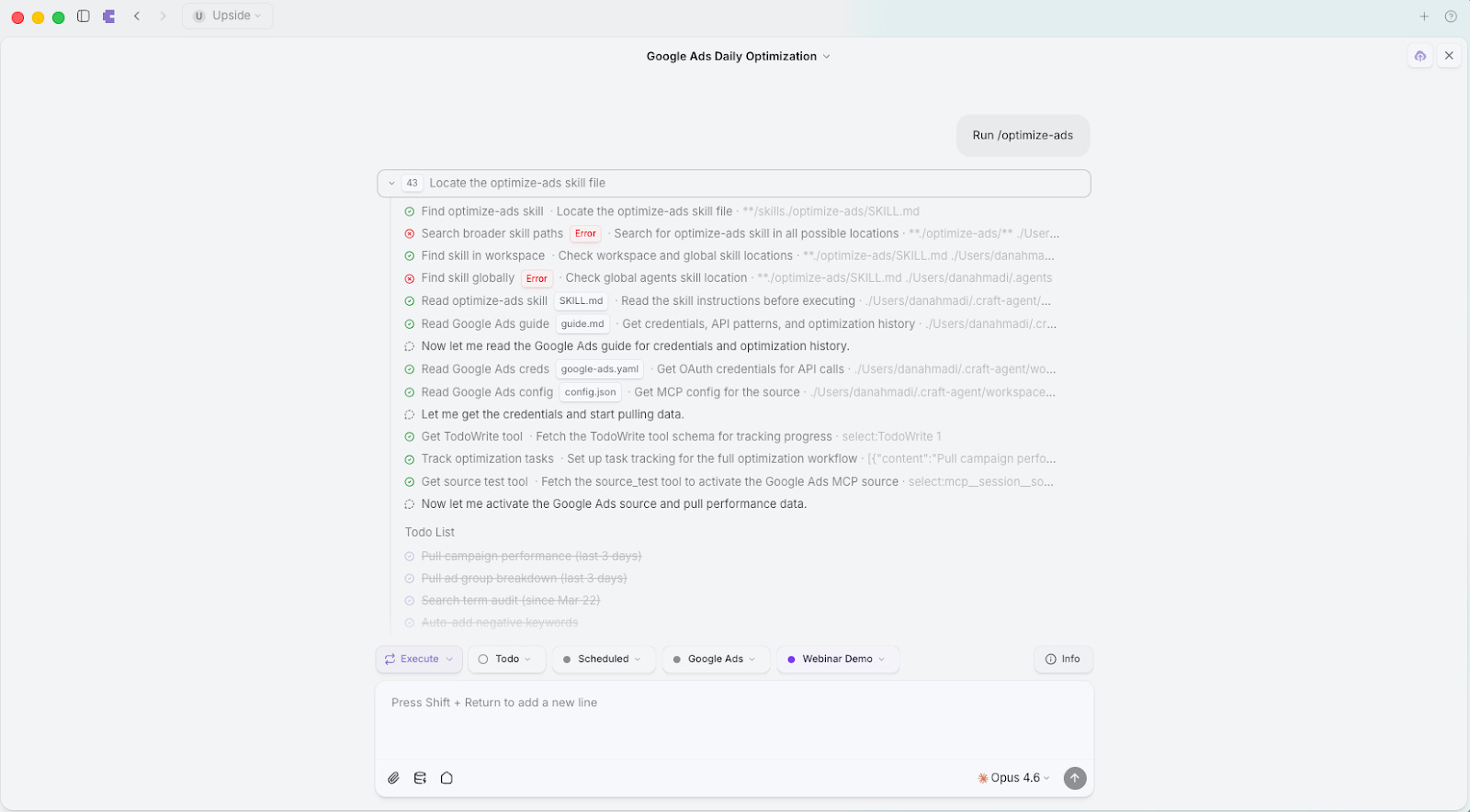
Beyond just pruning bad keywords, the agent also runs ongoing tests. It’s optimized to increase click-through rates and conversion rates, so it’s constantly experimenting with bid levels, ad copy, and landing page pairings. It logs the context of every test it runs, and on each daily optimization, it checks in on those tests to decide whether there’s enough data to call a winner or if it needs more time.
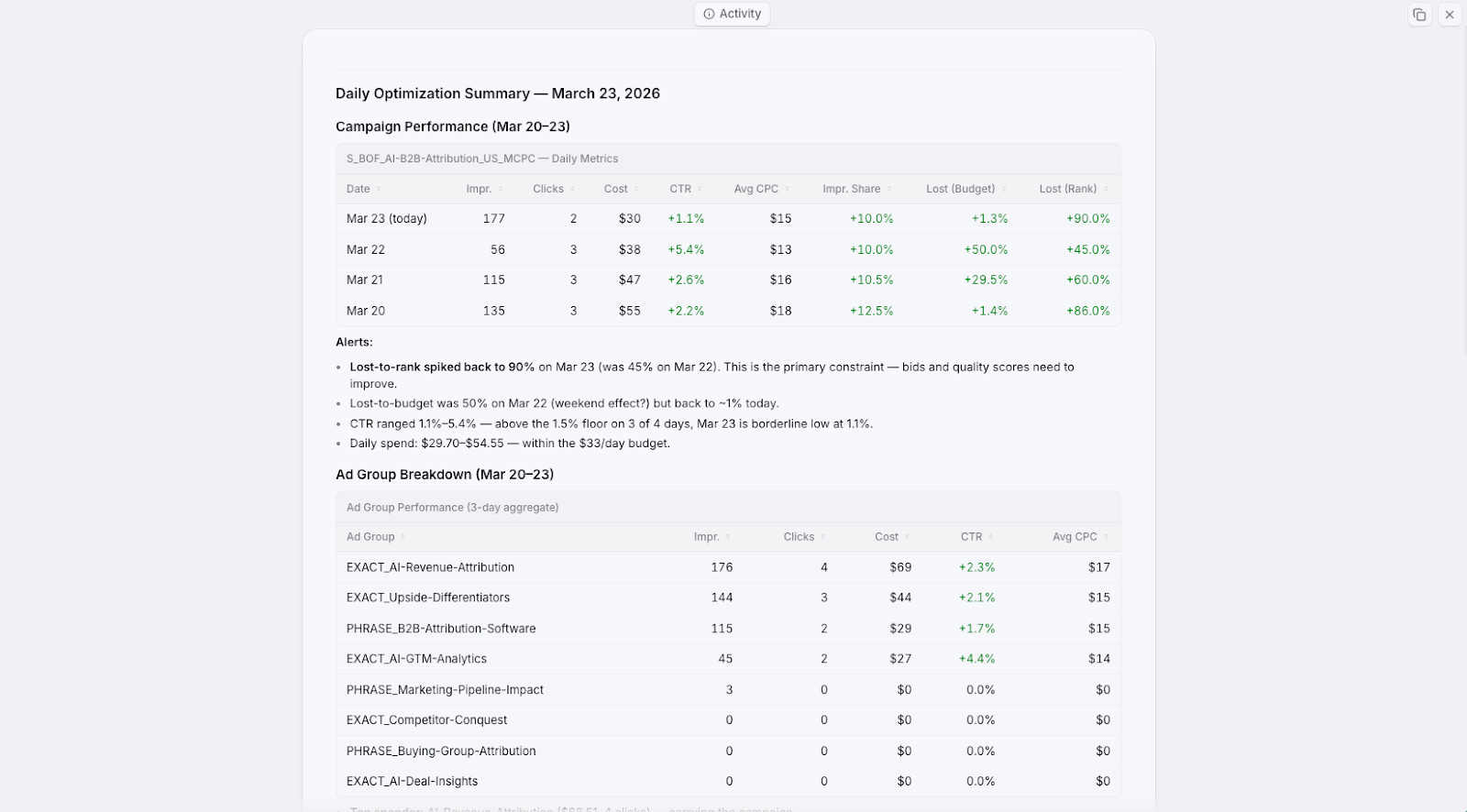
The daily summary shows green across the board. We’ve been running this for about a month, and every time we check, we see improvements in impression share and click-through rate because it’s constantly pruning low performers and adding better keywords and ad text.
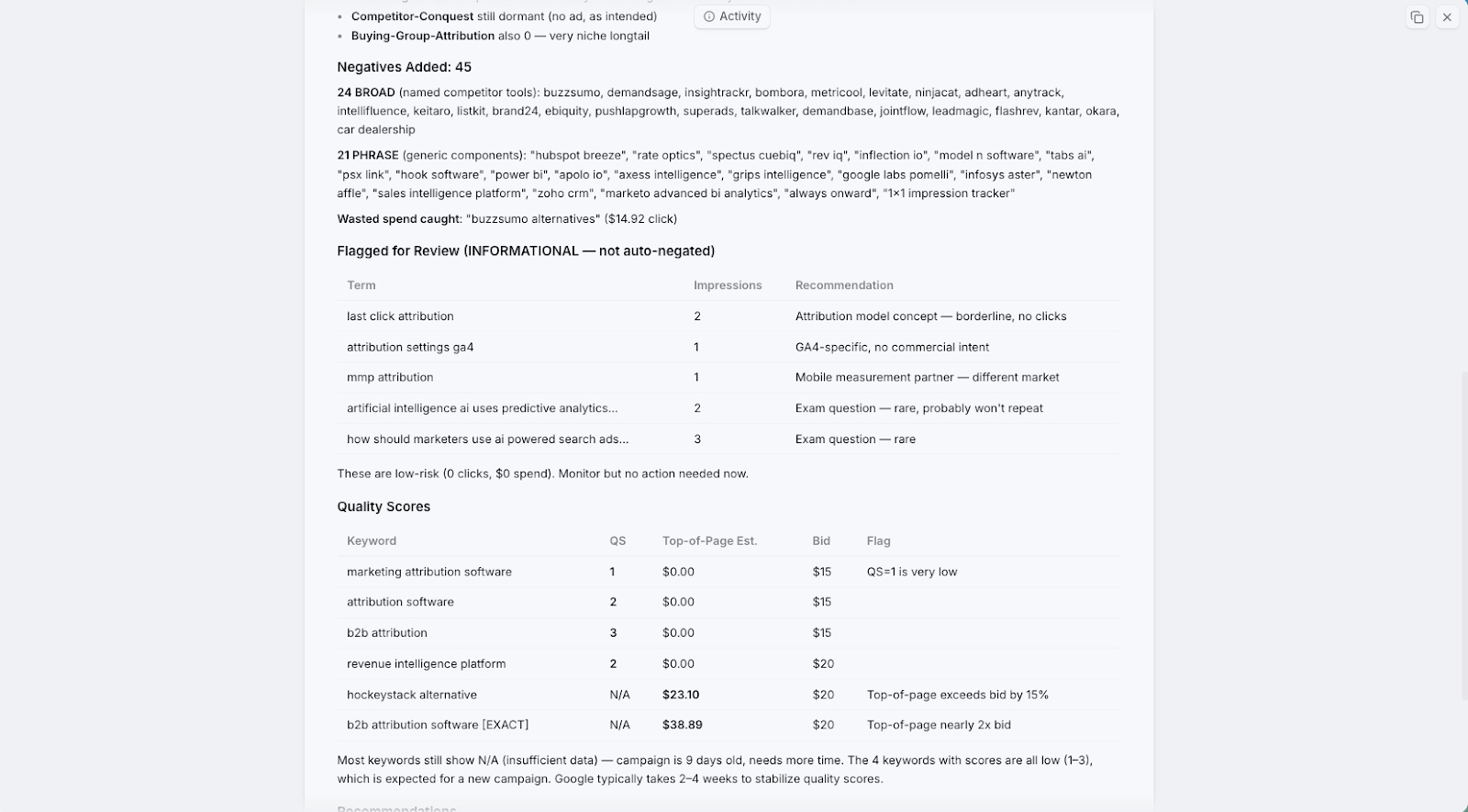
It’s even created all of Dan’s ad campaigns, ad groups, and naming conventions from scratch. In the beginning, he just told it: “Figure out a naming convention that works for you and stick with it.” It even recommended building custom landing pages to improve quality scores for specific keywords.
One fun detail: to connect to Google Ads via API, you need to go through an MCC account and submit an application. Dan had Craft look at the application, write a description of the optimization agent, create screenshots of a UI it designed, and submit it. Google approved it in two days.
Bonus: Marketing Operations Automation
Beyond these five main workflows, we’ve been using agents to automate a huge amount of our day-to-day marketing operations. Dan has over 40 connectors at this point. The philosophy is simple: most tools have either an API or an MCP, and once you start connecting them, things get really interesting.
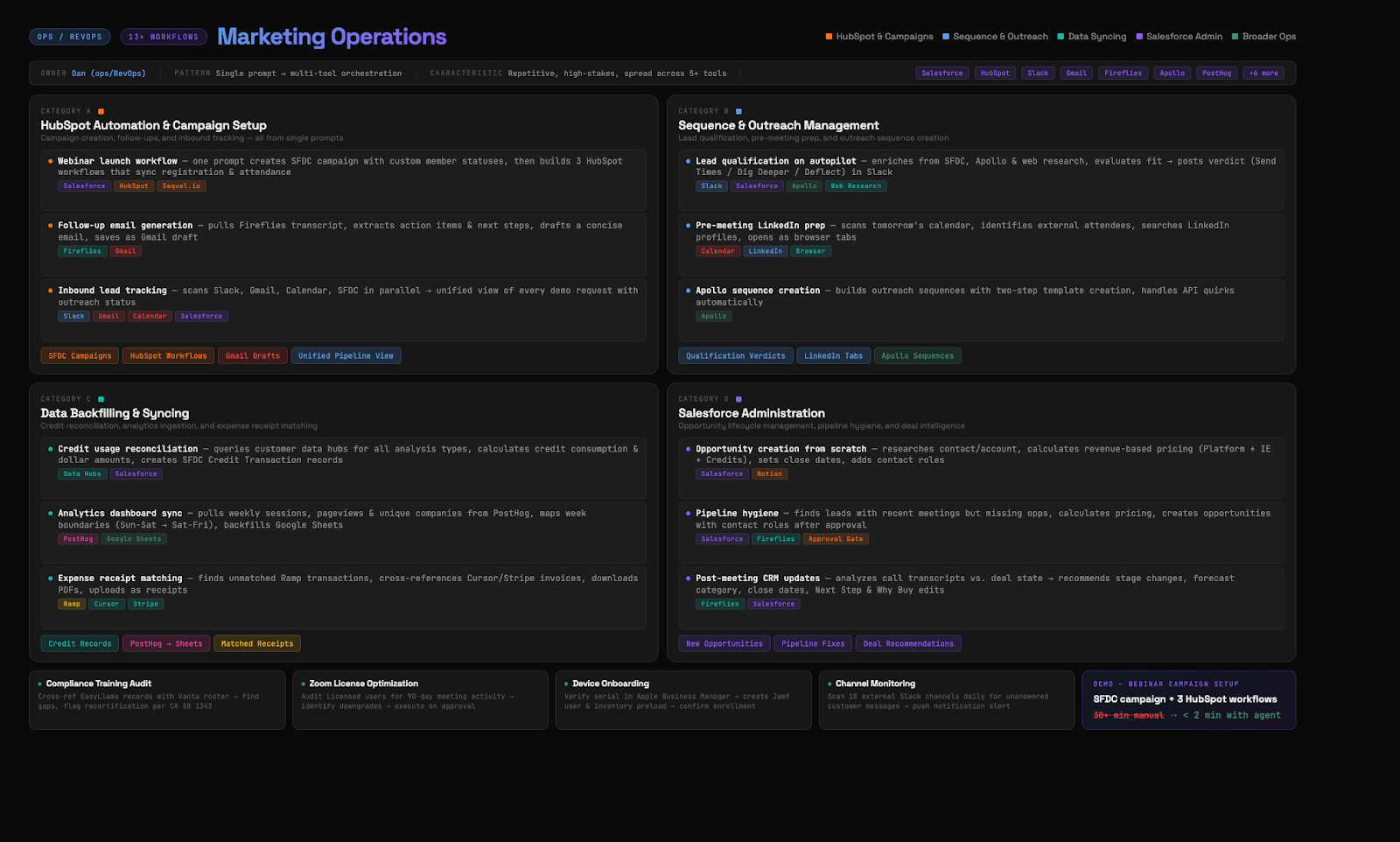
Here are some of the things we’re running on autopilot:
Webinar launch workflows. For this very webinar, we told the agent to set up all the HubSpot workflows, connect to SQL, sync to a Salesforce campaign. It did all of that. Then we said “turn that into a skill” because we’ll host more webinars and always want the same setup.
Personalized outreach. To promote the webinar, Dan asked the Upside MCP to look through all his emails, meeting invites, and transcripts, then provide a list of the top 100 people he should invite. The agent created the email template in Apollo. Dan just personalized each one.
Inbound lead tracking. An agent analyzes all inbound leads over the past few weeks, checks if we followed up, how many times, whether a meeting was booked, if they RSVP’d. It flags anomalies like someone who accepted a meeting but then RSVP’d no, and drafts a re-engagement email.
Lead qualification on autopilot. As leads come in, the agent does web research, historical research via MCP, figures out the context of that account and person, and makes a specific recommendation on how to follow up.
Weekly product analytics. This is common for marketing teams: a weekly deck with web visits, leads, MQLs. Dead simple with an agent. Connect to all the data sources, pull the numbers, and it creates Keynote slides that look exactly like your existing format. We actually found that Cursor creates better-looking slides than Google Slides. Especially good when you provide a template and tell the agent “this is the format, now populate it with this week’s data.”
Salesforce administration. Sometimes in a meeting someone says “we need two more fields in this report.” Dan just prompts the agent to create those fields. The fields get created, field-level security is set, they get added to page layouts. All the clicking that would normally take 30 minutes happens in seconds.
What We’ve Learned
A few things have become clear to us over the past few months of building all of this.
We feel more like managers now. Even though we don’t have a large team, all we do is give agents instructions and then review their work. It’s a different way of operating, but it’s surprisingly productive.
Always ask “how did you calculate that?” When agents give you stats or metrics, ask for citations and methodology. Our MCP has extensive instructions on how to compute metrics and it won’t make things up, but we still verify. If an agent says “pipeline increased 40%,” we ask “from where to where?” and “what’s the attribution?” Sometimes a number is technically accurate but misleading in context.
Multiple specialized agents beat one general agent every time. Context windows are still the limiting factor. One agent doing a complex multi-step job will start forgetting instructions partway through. Nine specialized agents, each with a narrow focus, produce way better results.
Memory is the hard problem. When one agent learns something from a report, how does that knowledge get shared? We’re building our own memory systems for this, and it’s something the entire industry is working on.
The model matters more than anything. If your results aren’t good, check which model you’re using. Opus 4.6 is so much better than Sonnet or Haiku for these tasks. If you tried AI for marketing work a few months ago and weren’t impressed, try again now. The improvement is significant.
Human review is still essential. Nothing gets published or sent without our eyes on it. But the nature of our work has shifted from “doing the thing” to “reviewing and directing the thing.” We think the future of marketing is actually more fun, because we get to focus on the creative, strategic work and hand off the repetitive, boring parts to agents.
We’re building Upside to be the intelligence layer on top of your GTM data, and these workflows are proof of what becomes possible when your data is structured in a way AI can actually understand. If you want to try any of this yourself, the MCP connectors, skill files, and prompt templates we used are all available. Just reach out.
Great insights in blog + the youtube video. Thanks for sharing <3