



Last week we hosted a webinar with three people who are basically doing our job better than we could. Matt Grebow from ServiceTitan built personalized sales kits for 100 closed-lost accounts in two days. Carl Gunlefinger from Comply shipped a paid search dashboard in 30 minutes. Charlie Flanagan from Dscout turned 520 closed-lost deals into a coaching system his sales team is actually using.
None of them wrote traditional code. All three are what our own Alex keeps calling GTM engineers, building real analytical apps on top of their own GTM data using the Upside MCP, Claude, and Craft Agents. A year ago, every one of these would have been months of data team work.
And here is the punchline nobody gets tired of saying: AI makes it possible to ask much better questions and build internal tools in hours, not weeks. But that only works if the data underneath is clean. That is where Upside sits, and all three of these builds ride on top of it.
Also if you are interested in seeing live demos of AI Marketers or GTM Engineers building with AI, join us for our next event!
A Quick Note on Upside
For people new to us: Upside is the data foundation for GTM engineering. We connect to Salesforce, Gong, HubSpot, Marketo, plus all the unstructured stuff that never makes it into the CRM (emails, meeting transcripts, notes) and we rebuild a clean, trustworthy version of what actually happened in every deal.
Entity resolution, buying group detection from signals buried in emails and calls, touchpoint reconstruction, activity deduplication. On top of that foundation we add dashboards, Deep Research reports, pre-built analysis recipes, and an MCP (Model Context Protocol) that any AI agent or custom mini-app can query directly. Every build below sits on that foundation.
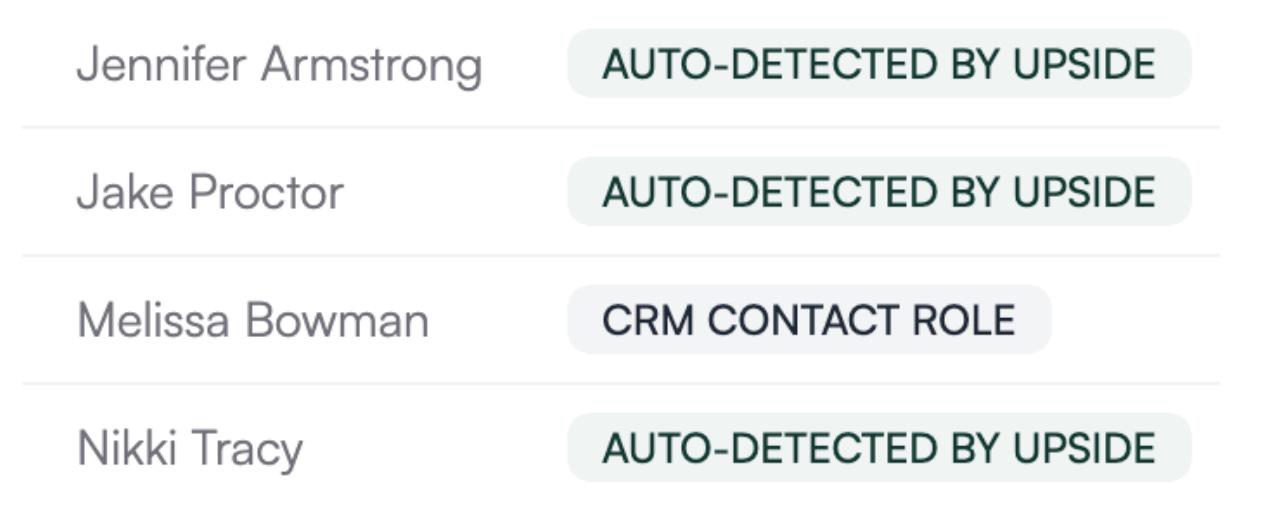
One example of data healing: Upside automatically detects buying group members that were never logged as contact roles in the CRM.
Meet Today’s GTM Engineers
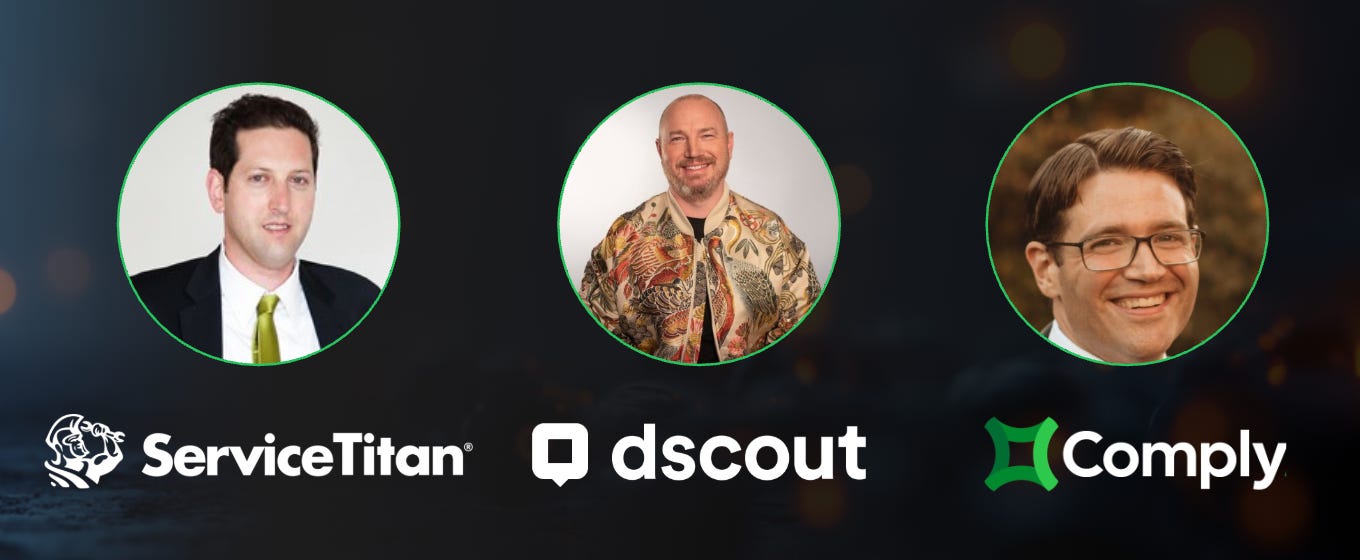
Matt Grebow // ServiceTitan - Director of Enterprise Marketing
Built: Roofing Win-Back Sales Kit for 100 accounts
Carl Gunlefinger // Comply - Senior Marketing Operations Manager
Built: Paid Search Impact, Webinar Performance, and a Single-Deal Replication Dashboard
Charlie Flanagan // Dscout - Head of Marketing Operations
Built: Loss Analysis System and Contact Engagement Tracker
100 Personalized Sales Kits in Two Days
Matt runs enterprise marketing at ServiceTitan. He told us he started using AI reluctantly, thinking carefully about which skills his team should keep doing as humans and what was safe to delegate.
The necessity part was harder to ignore. ServiceTitan had plenty of tools measuring activity and logging touchpoints, but the valuable context was sitting in sales emails, Gong calls, and notes nobody had time to read.
“We were collecting and reporting on signals, and from those signals we were inferring intent. But the context of those signals lives with sales, in emails and phone calls and notes. Upside stitched a lot of these data points together, and when I saw that, it created this epiphany for me where I finally understood what was possible.” // Matt Grebow, ServiceTitan
The Problem
The sales team wanted to re-engage about 100 closed-lost roofing accounts that had seen a demo once and passed. Generic follow-up emails were not going to cut it.
The Solution: An Auto-Generated Win-Back Sales Kit
Matt’s vision was a detailed, company-specific narrative for each of the 100 accounts. His list:
• A summary of all previous opportunity notes and calls, including transcript summaries
• A list of the important contacts and what each of them cares about, gathered from both first-party conversations and third-party research
• A summary of all product enhancements ServiceTitan had shipped since that account last saw a demo, tied back to that account’s specific interests
• Talking points and objection handling mapped to each contact’s role and business concerns
• A draft email sequence for each company and contact
Then he said the part we loved: “and oh yeah, let’s do this for a hundred accounts.”
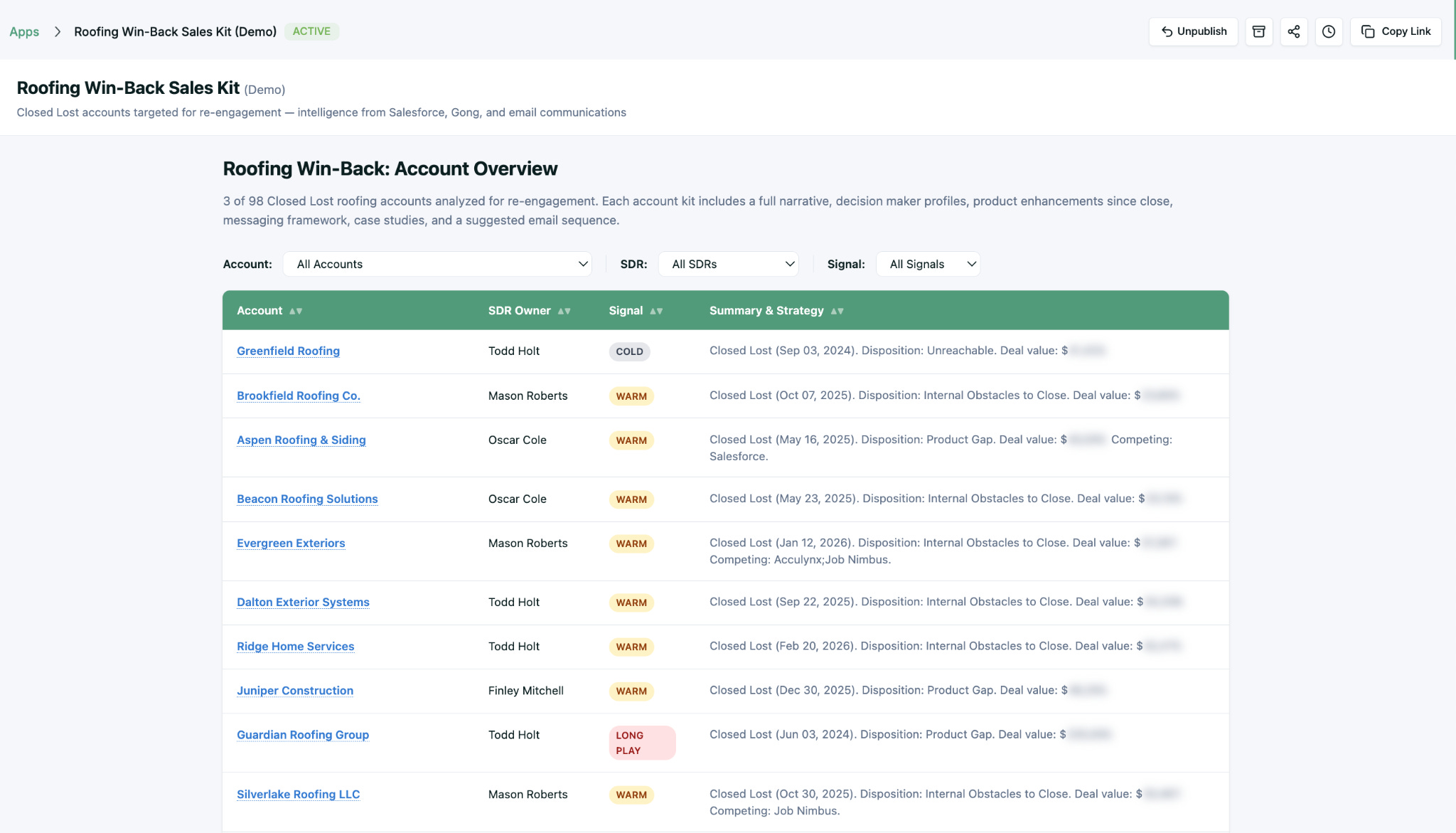
The data came from Salesforce, Gong, and Marketo, passed through Upside and cleaned up, with a layer of third-party research and intent signals on top.
Each kit opens with a re-engagement assessment and jumps into recent news, account narrative, decision makers, product enhancements since close, messaging framework, talking points, case studies, and draft emails.
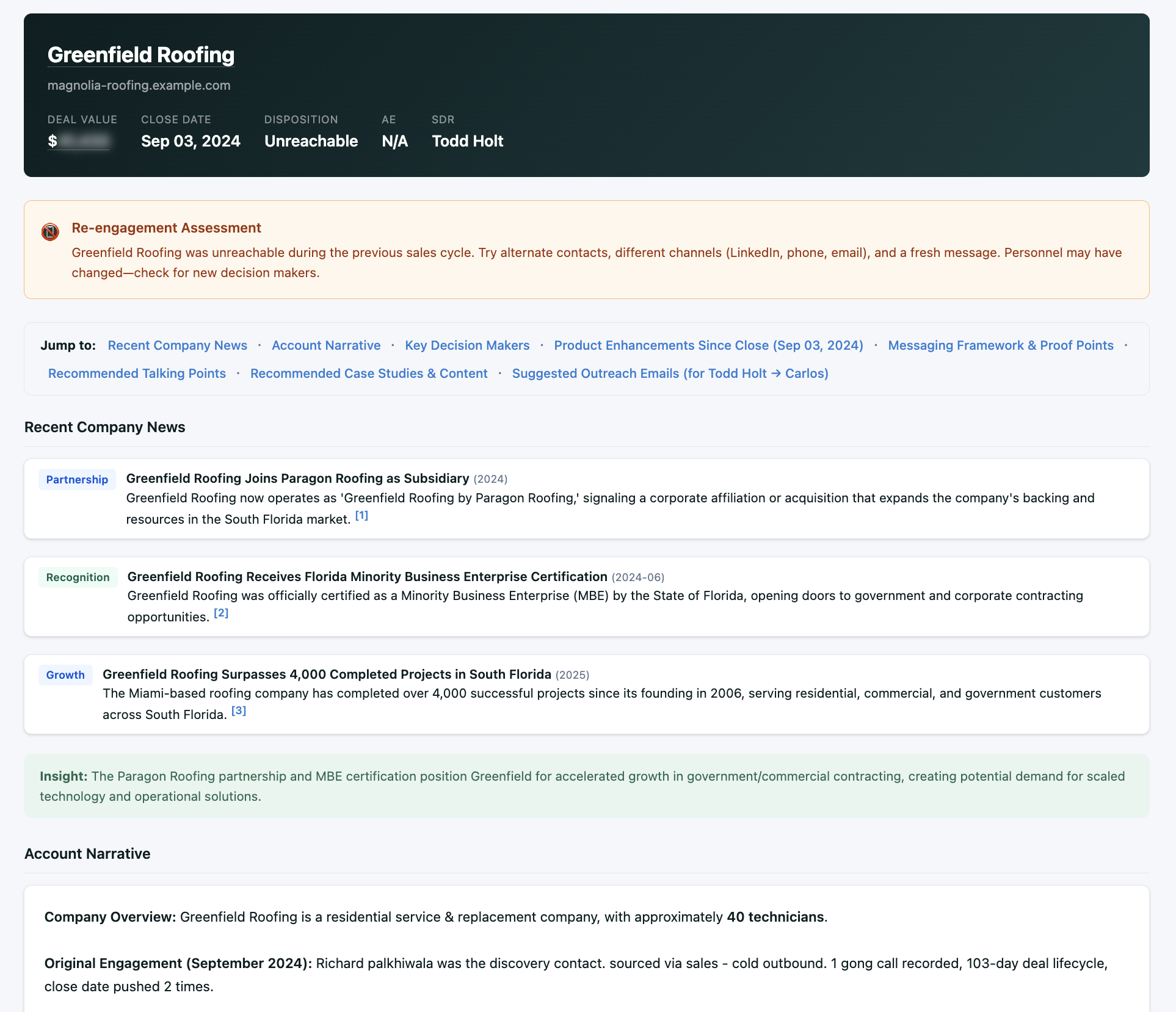
A couple of sections surprised even Matt. With access to ServiceTitan’s positioning docs, the agent started generating mini battle cards tailored to each account’s competitors. Pointed at their case study library, it pulled the exact stats and testimonials that mapped to each account’s concerns.
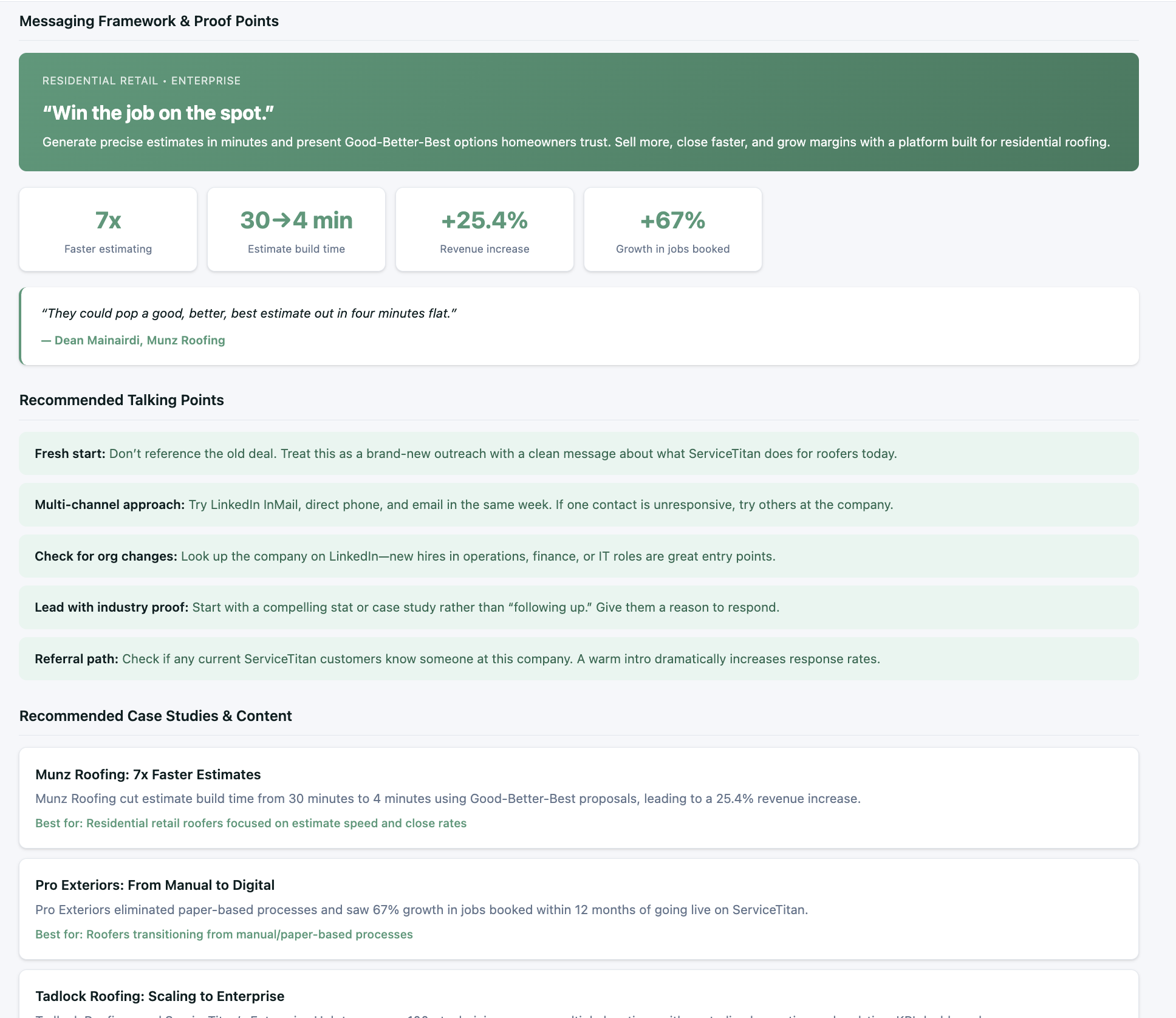
The Impact
Idea to first draft: one day. Another day of feedback. Two days total for a system that covers 100 accounts.
“I gave it a list of the topics I wanted to cover, pointed it toward the data sources, and Claude built the kit.” // Matt Grebow, ServiceTitan
If you want to see the demo in action, we published a short clip of Matt walking through it.
From Question to Published Dashboard in 30 Minutes
Carl runs marketing operations at Comply. Mailroom at an accounting firm, recovering attorney, six years in ops and analytics at Connect America, seven-plus years in marketing operations now. Exactly the right kind of person to build these apps.
Carl wanted to solve something a lot of ops people recognize: give leadership the top-level KPIs and give the operators underneath the actionable detail, all in the same place. His words: zoom out and zoom in at the same time.
“By nature, I love building reports. I love figuring out ways to put information together that doesn’t belong together. It’s been a blessing and a curse. This new tool really makes it a blessing.” // Carl Gunlefinger, Comply
He built three mini-apps. We had questions about all of them.
Mini-App 1: Paid Search Impact
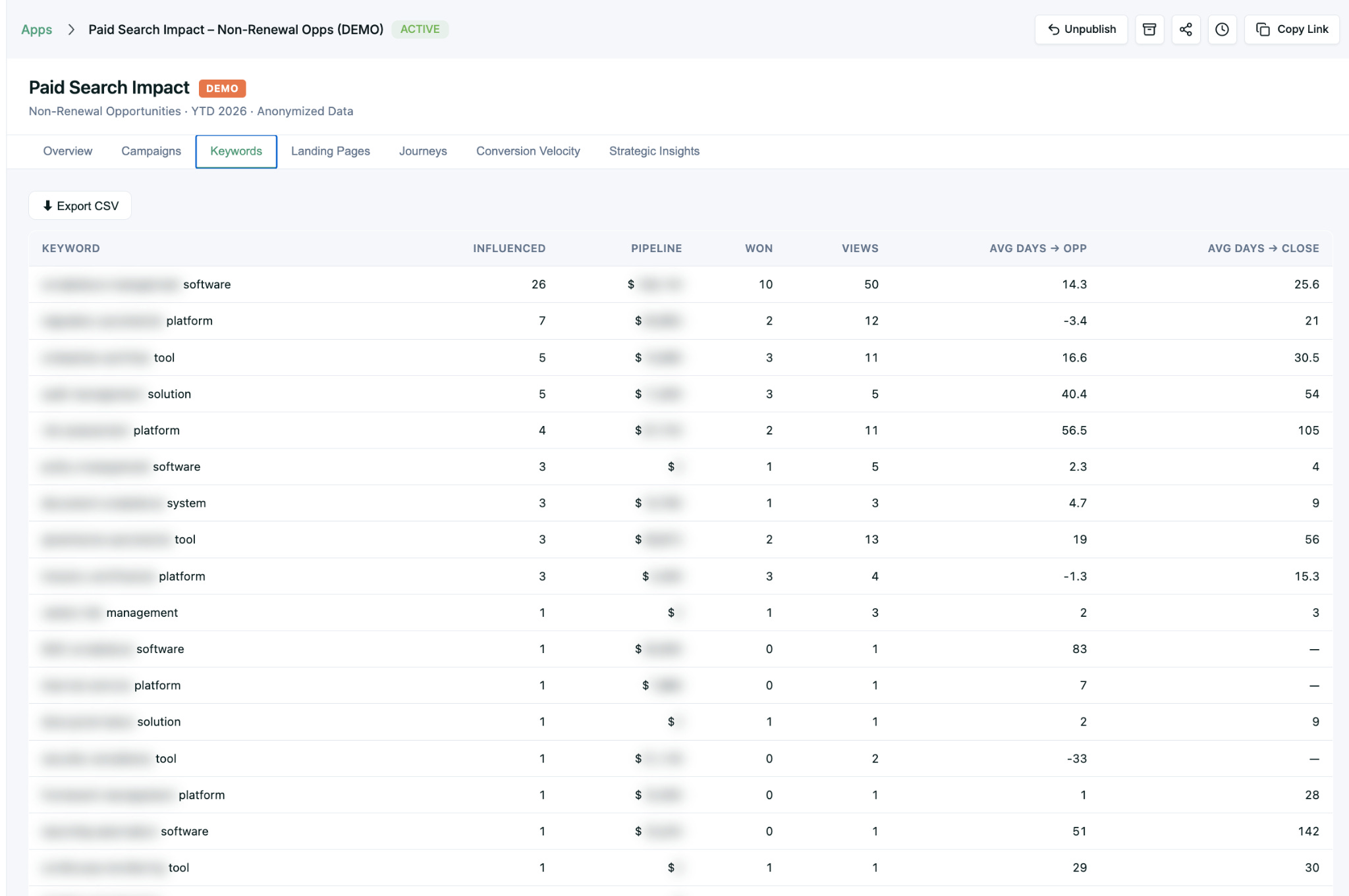
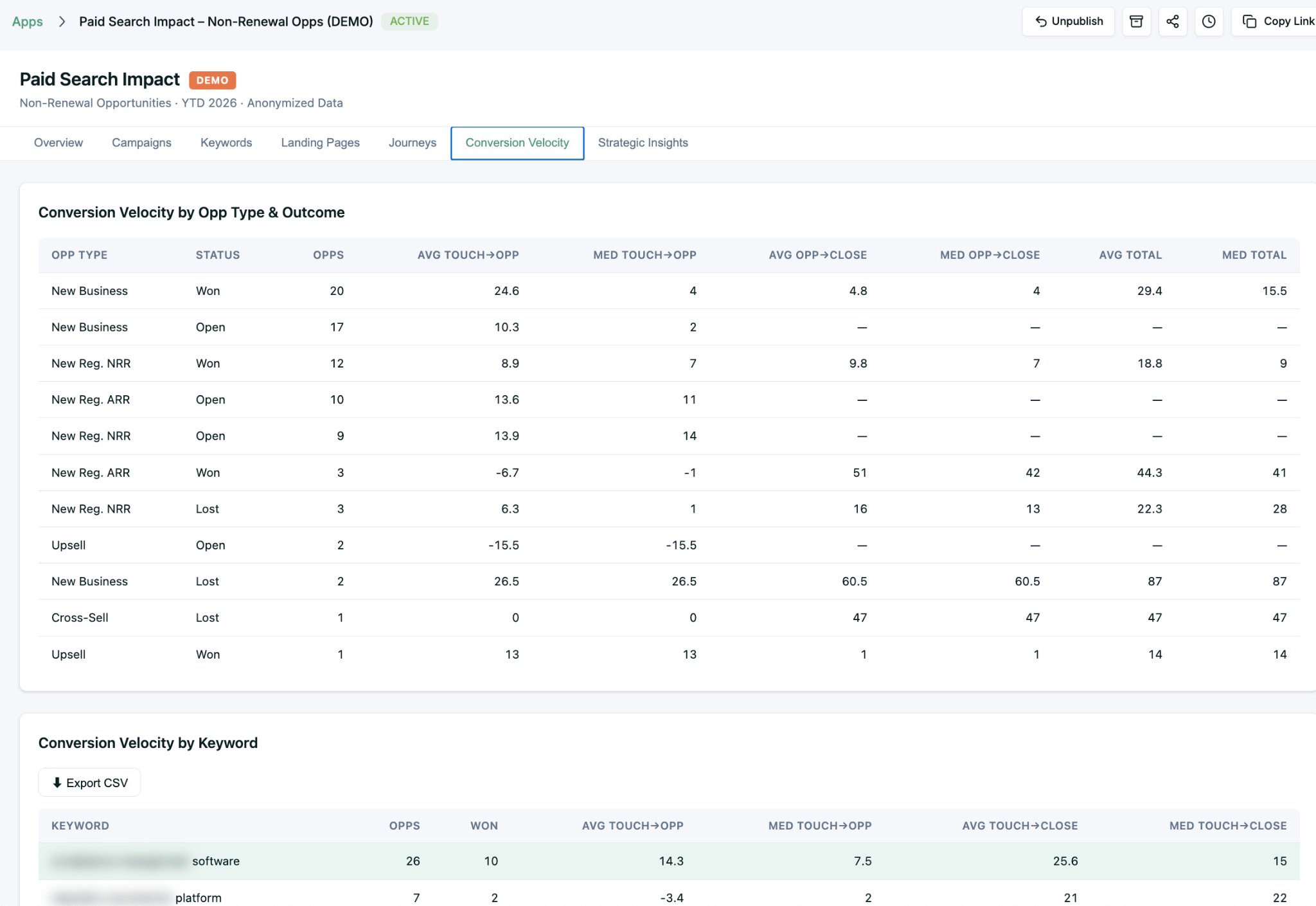
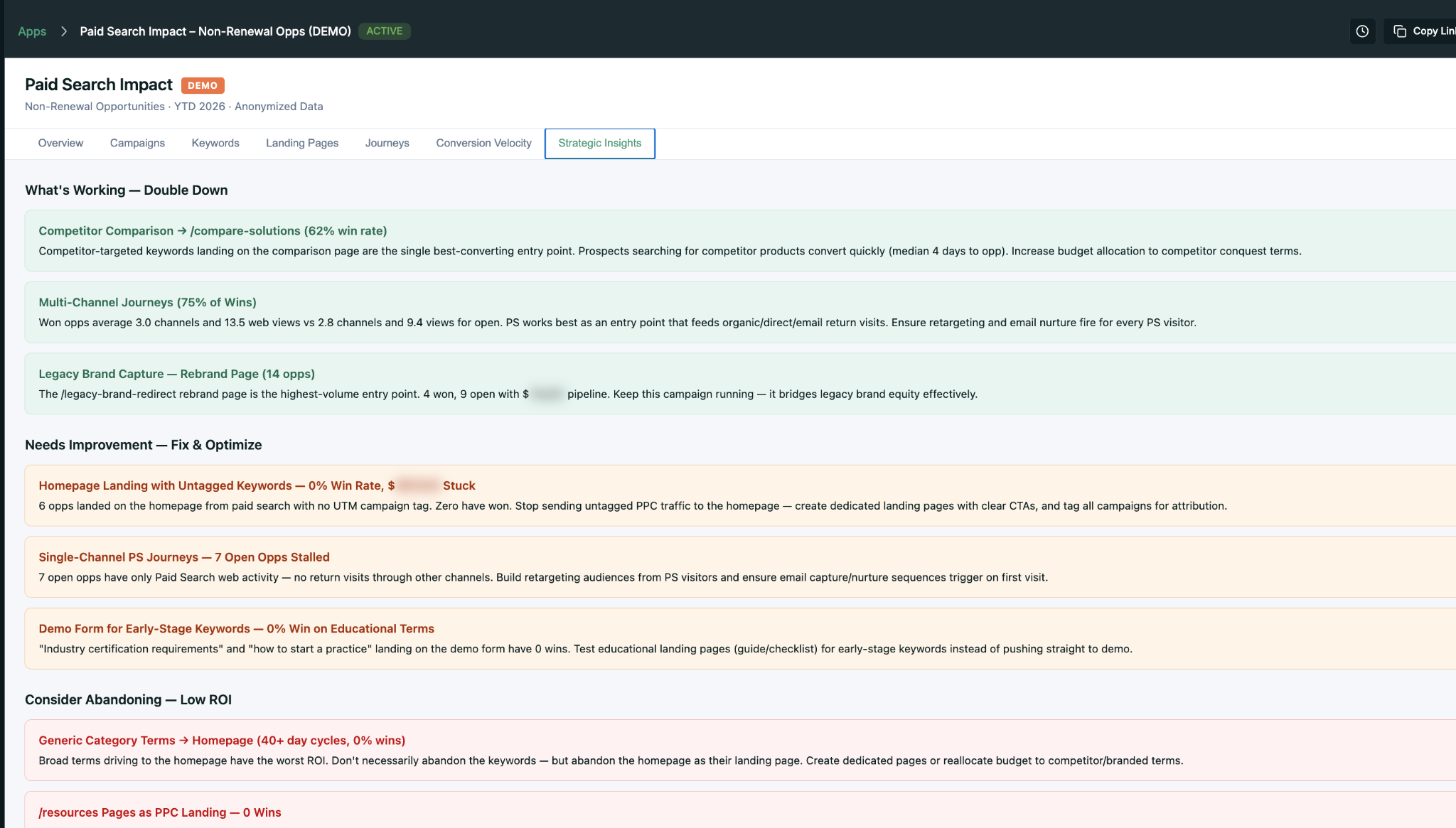
Paid search is one of Comply’s few big investments this year. Direct conversions are trackable in Salesforce, but every marketer knows direct conversions are the tip of the iceberg.
Carl typed one question into Claude via Craft Agents, asked three follow-ups, and had a published preview 30 minutes later. Six tabs: Overview, Campaigns, Keywords, Landing Pages, Journeys, Conversion Velocity, Strategic Insights.
Mini-App 2: Webinar Performance Dashboard
Tying every webinar back to pipeline and revenue is the painful part. Carl built it anyway.
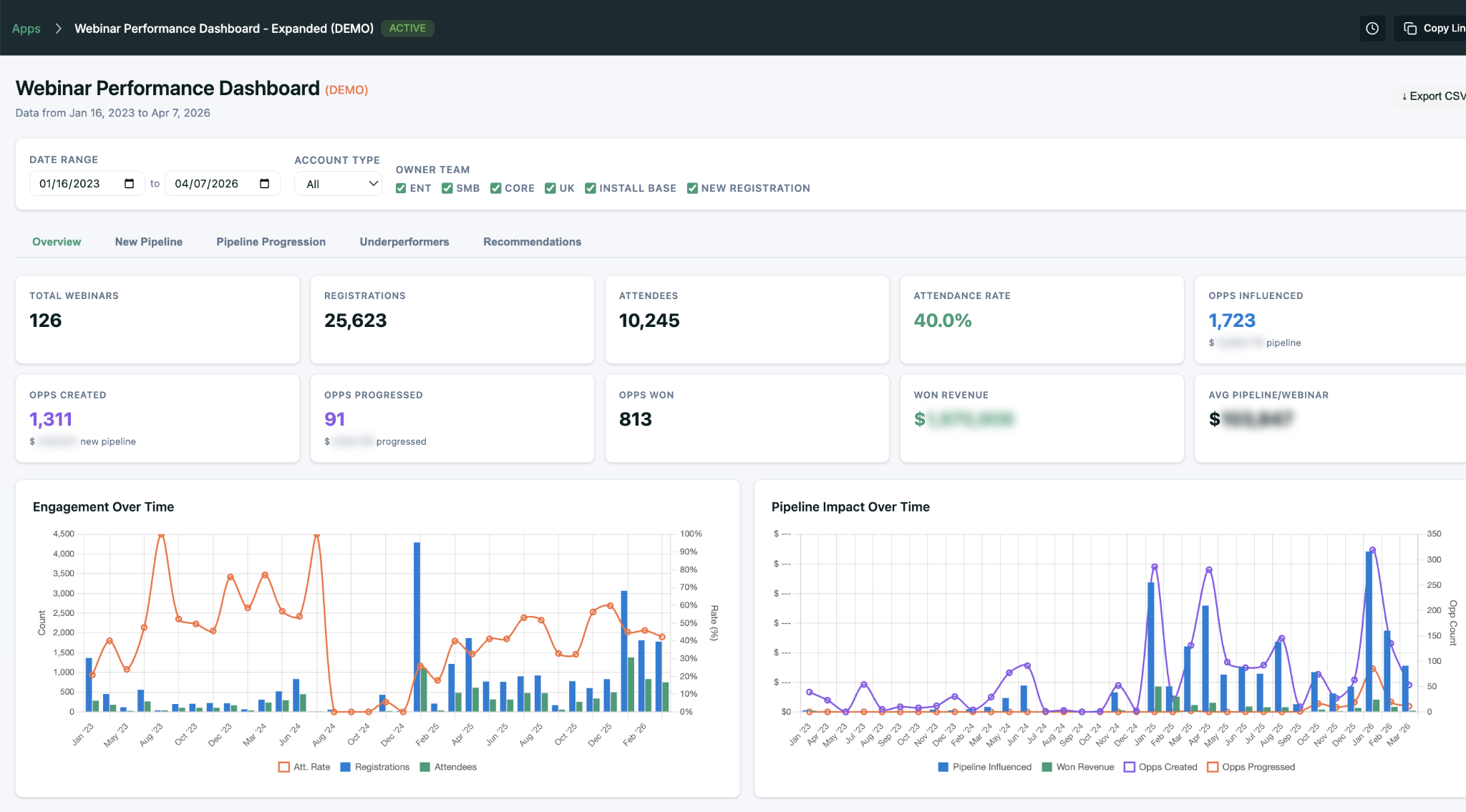
We have done that by hand for years in our own dashboards. If you use the MCP, the agent is smart enough to figure it out itself.
Mini-App 3: The Single-Deal Replication Playbook
Our favorite. Carl’s sales leaders closed a deal last quarter and wanted to understand how to replicate it. So Carl built a dashboard for that one deal: every touchpoint, every channel, every person, every inflection point, and the replication playbook you could pull from it.
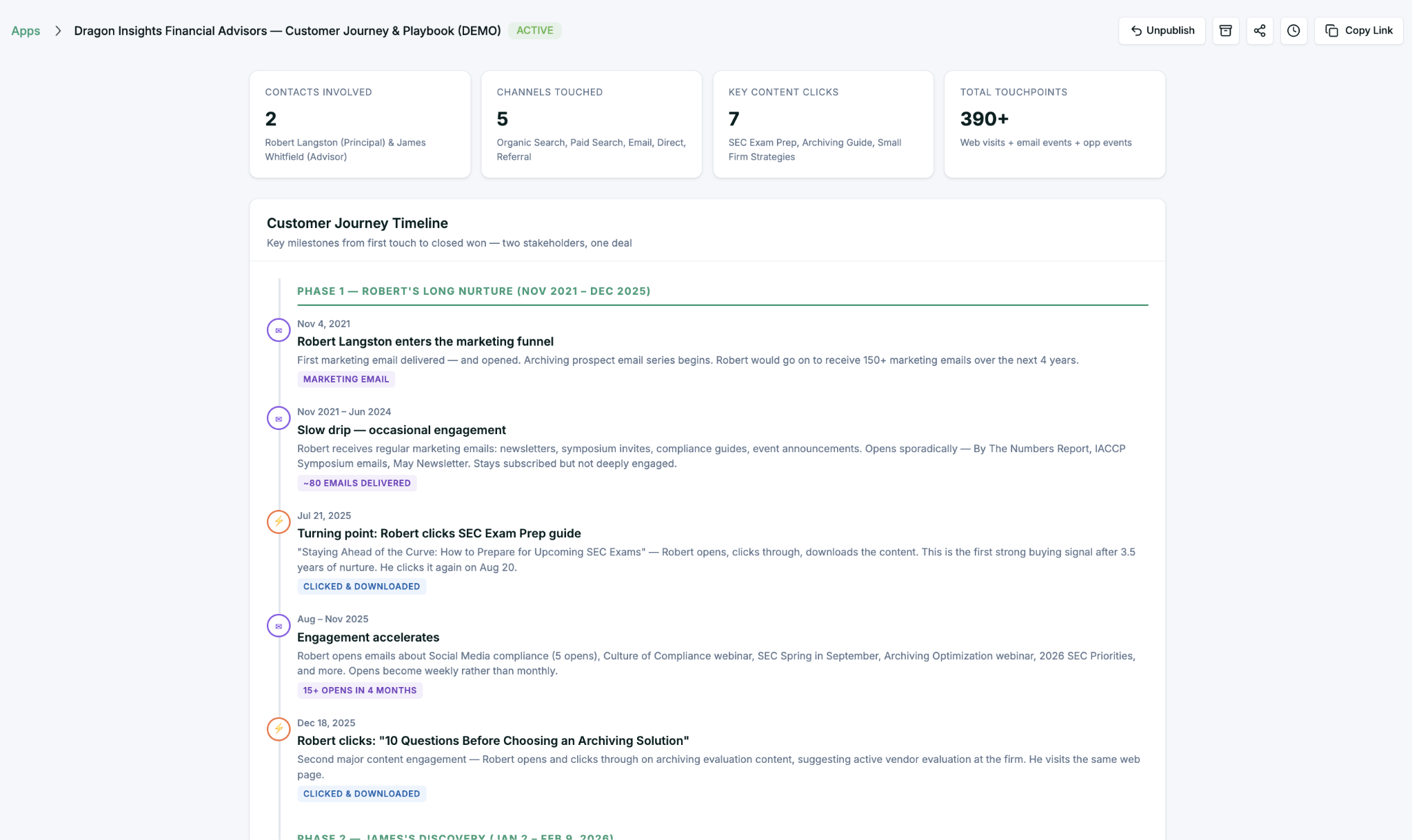
Carl ran Upside’s activation analysis first, then built the dashboard through the MCP. The aha: how many channels and touchpoints contributed to this one deal, and how many replication suggestions came out of the pattern. He is already making a dynamic version so sales and marketing can pick any opportunity and pull up the same playbook.
“Literally from idea to preview publication, probably 30 minutes.” // Carl Gunlefinger, Comply
Turning 520 Closed-Lost Deals Into a Coaching System
Charlie heads up marketing operations at Dscout, an AI-powered user research platform. A decade in SaaS, seven years deep in marketing ops. Dscout’s CMO likes to say the team needs to “defend the budget,” and Charlie lives that.
“A lot of what we did originally was just exporting Salesforce reports and me manipulating data in spreadsheets. It was a big time sink.” // Charlie Flanagan, Dscout
The Problem
Dscout had 520+ closed-lost opportunities with the usual surface-level CRM reasons (timing, budget, product fit) and a sales team that needed real narrative insight to improve. Who did we actually lose to? Who wasn’t in the room? What do winning deals have that lost ones don’t?
The data to answer those questions exists, but it is scattered across Salesforce, Gong, HubSpot, and sales activity logs. Stitching it together by hand is exactly the kind of work that makes ops people tired.
Mini-App 1: Closed-Lost Analysis
Charlie’s closed-lost analysis gives an overall breakdown of why deals were lost, the dollars tied to each reason, and filters to ask more specific questions. New product launching that addresses a specific loss reason? Here are the exact accounts you can go back to.
The app also gets into competitive data: who Dscout is in bake-offs with most often, on which accounts, and whether losses came from a single factor or multiple factors stacking.
But the tab Charlie gets the most use out of, and the one Mada called out as her favorite, is “How to Win.”
“Closed-lost opportunities filtering has been recognized as a significant win. It gives our sales leaders something specific to train on.” // Charlie Flanagan, Dscout
Mini-App 2: The 3 Contacts Engaged Tracker
You need to be multithreaded to sell enterprise SaaS. At Dscout, when the team engages three or more contact roles on an opportunity, win rates jump significantly. Charlie built a mini-app to track exactly that.
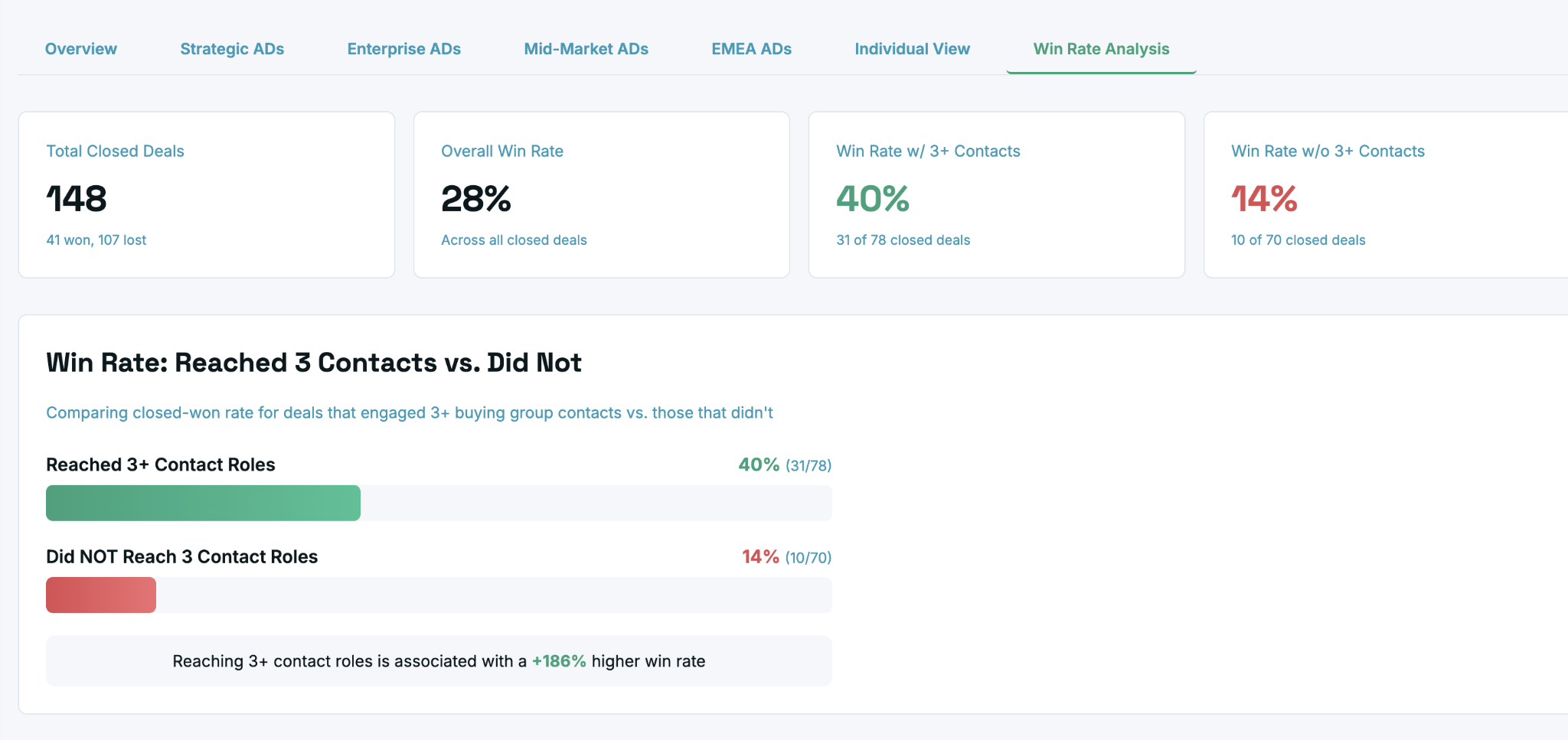
Then Charlie made it operational. Not a static dashboard but a live view sales leaders use for coaching. Filter to a team or rep, see which open deals have three engaged contacts and which don’t, see how fast those contacts got engaged and what stage the deal is at.
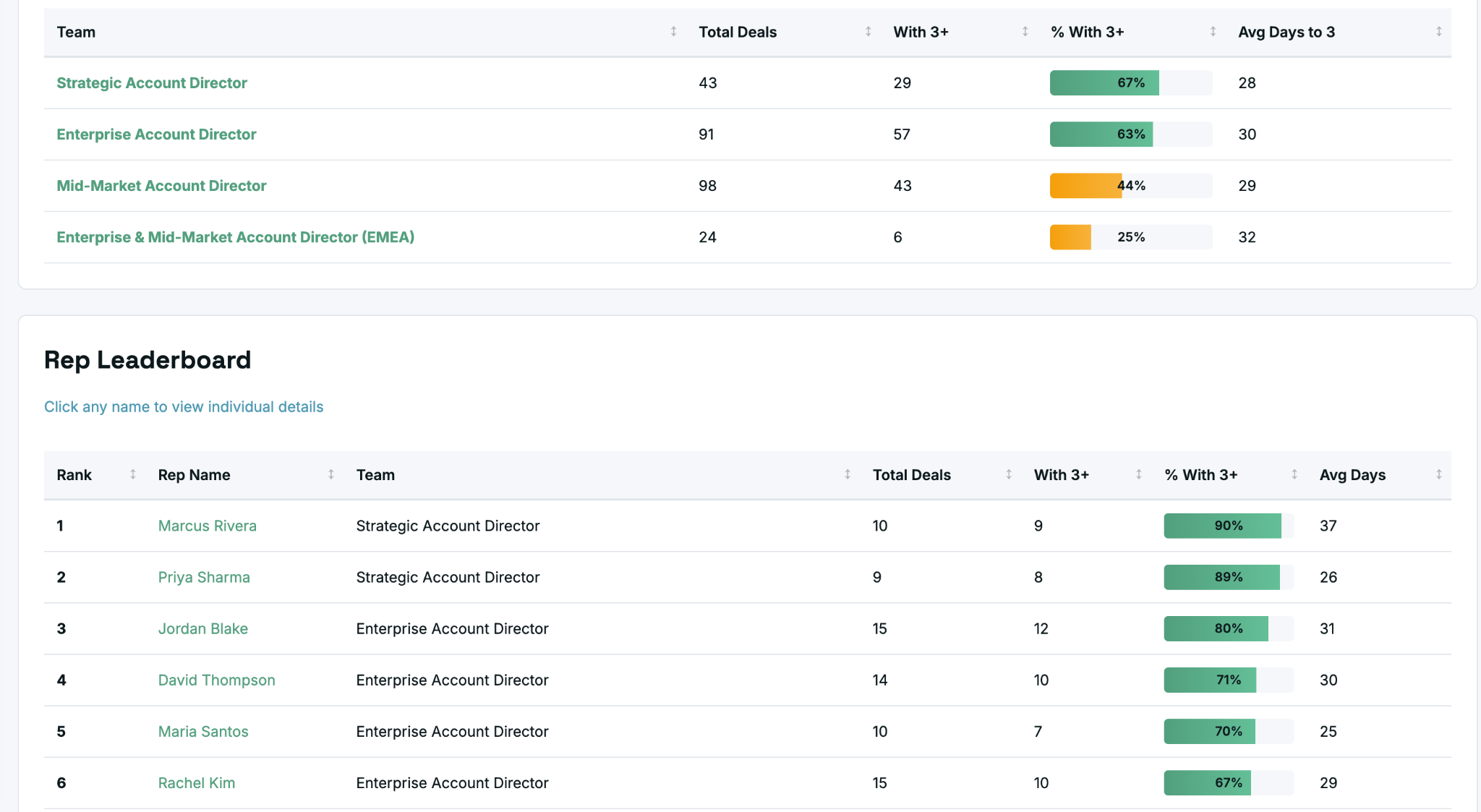
What Charlie loved: Upside already heals the buying group and identifies everyone actually involved in a deal. This app intentionally compares that to who sales manually added as a contact role. The gap becomes the coaching conversation. “Upside knows Jennifer Armstrong is a stakeholder on this deal. Why haven’t you added her as a contact role?”
Small detail we loved: Charlie asked Claude to add mouse-over explanations on every data column. Hover over a field and the app tells you exactly how the number was calculated. He called it “a pretty awesome unlock” for sharing apps with colleagues who didn’t build them.
Charlie shared the closed-lost analysis with Dscout’s go-to-market leaders in a marketing metrics meeting last week. If you want to see him walk through how he built with us, we have a short clip of Charlie on the Upside channel.
What Matt, Carl, and Charlie Have in Common
Three patterns show up in all three builds:
Speed. Idea to deployed mini-app in hours. Two days for Matt’s 100-account kit. 30 minutes for Carl’s paid search dashboard. The real investment is no longer engineering time. It is the quality of the question being asked.
No code. Nobody wrote traditional code. They described what they needed, pointed the agent at the data, reviewed, iterated. Matt used Claude. Carl used Claude via Craft Agents. Charlie used Claude through Claude Cowork.
Good data is the moat. Every one of these apps sits on top of Upside’s cleaned, unified data layer. Without data healing, deduplication, and buying group detection underneath, you just get confident hallucinations on top of broken CRM fields.
Watch the Full Webinar
Every demo in this post is worth seeing live. Full recording:
More From Our YouTube Channel
A few more videos we have published that go deeper on pieces of this:
• Personalized Sales Kits for 100 Accounts in 2 Days // Matt’s Win-Back Sales Kit in a short clip
• Upside Gave Me the Keys to the Kingdom // Charlie on going from biweekly collaboration to building his own mini-apps
• Start Small, Prompt Better // The three big lessons from Matt, Carl, and Charlie
• AI + Personalization = Less Generic Marketing // Matt’s take on why AI actually makes marketing more human
• How to Automate Five Marketing Functions // Our own webinar covering five marketing workflows we’ve automated
• How Dscout Connected HubSpot, Salesforce, and Gong in 5 Minutes // The original MCP integration demo that got Charlie started
• What Are MCPs and Why They Still Matter // Tools vs Skills, APIs, and building local MCPs
• Three Favorite AI Developer Tools Marketers Should Use // Claude, Craft, and Cursor
• How to Uplevel Your GTM Reports With AI and the Upside MCP // A practical walkthrough of building analytical mini-apps
• How to Automate Case Study Creation With AI and Upside MCP // From transcript to published page
• How to Build a Fully Automated, Self-Improving Ads Orchestrator // Level 10 on the GTM AI Adoption Ladder
Subscribe to the Upside YouTube channel for more of these walkthroughs, or check out our Future of Marketing podcast wherever you listen.
And if you want to see what building on top of Upside looks like for your own GTM data, you can start at upside.tech.